<?xml version="1.0" encoding="utf-8"?><feed xmlns="http://www.w3.org/2005/Atom" ><generator uri="https://jekyllrb.com/" version="4.4.1">Jekyll</generator><link href="/feed.xml" rel="self" type="application/atom+xml" /><link href="/" rel="alternate" type="text/html" /><updated>2026-03-29T05:30:31+00:00</updated><id>/feed.xml</id><title type="html">UI eXtension Guides</title><subtitle>Guides for UI eXtension (UIX).</subtitle><author><name>Lint-Free-Technology</name></author><entry><title type="html">Fullscreen media player dialog</title><link href="/dialogs/2026/03/29/fullscreen-media-player-dialog.html" rel="alternate" type="text/html" title="Fullscreen media player dialog" /><published>2026-03-29T00:00:00+00:00</published><updated>2026-03-29T00:00:00+00:00</updated><id>/dialogs/2026/03/29/fullscreen-media-player-dialog</id><content type="html" xml:base="/dialogs/2026/03/29/fullscreen-media-player-dialog.html"><![CDATA[<div class="admonition info rounded">
    <p class="admonition-title">Host/element path selector</p>
    <p>
        <p>Applying this guide requires the <code class="language-plaintext highlighter-rouge">&amp;</code> <a href="https://uix.lf.technology/concepts/dom/#hostelement-path-selection">Host/element path selector</a></p>

    </p>
</div>

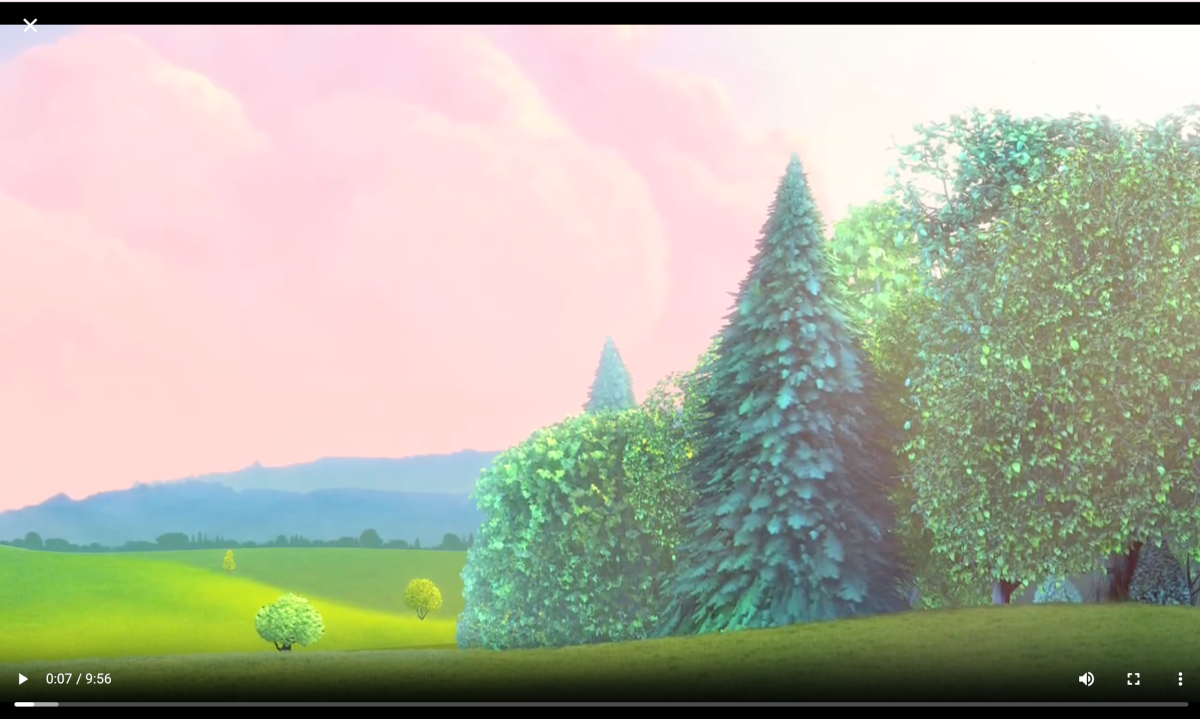
<p>When viewing media in the Home Assistant Media panel, the dialog used is large in size. This guide shows how to make the dialog fullscreen, without title so you can focus on the media itself. Videos will fit by default and img styling is included to make sure they are contained.</p>

<p>Styling dialogs is done using a theme. Check out <a href="/dialogs/2026/02/27/styling-dialogs.html">styling dialogs</a></p>

<h2 id="style-dialog-size">Style dialog size</h2>

<p>First the dialog needs to be set to full width and height. As the web browser media player uses dialog size large <code class="language-plaintext highlighter-rouge">--ha-dialog-width-lg</code>, the size used when dialogs have size set to large, is overridden. Also set is <code class="language-plaintext highlighter-rouge">--ha-dialog-width-full</code> which is the size used when the dialog is shown on a small device screen. Safe areas are not considered here as it is likely you would wish the dialog to cover all of a device’s screen.</p>

<p>The web browser play media dialog will have a class of <code class="language-plaintext highlighter-rouge">.type-hui-dialog-web-browser-play-media</code>. This is used with a CSS selector to target the dialog only when it has class of <code class="language-plaintext highlighter-rouge">.type-hui-dialog-web-browser-play-media</code>.</p>

<p>Yaml style selectors are used as they will be needed in the following steps.</p>

<div class="language-yaml highlighter-rouge"><div class="highlight"><pre class="highlight"><code>  <span class="na">uix-dialog-yaml</span><span class="pi">:</span> <span class="pi">|</span>
    <span class="s">.: |</span>
      <span class="s">ha-dialog.type-hui-dialog-web-browser-play-media {</span>
        <span class="s">--ha-dialog-width-lg: 100vw;</span>
        <span class="s">--ha-dialog-width-full: 100vw;</span>
        <span class="s">--ha-dialog-min-height: 100vh;</span>
        <span class="s">--ha-dialog-border-radius: 0;</span>
        <span class="s">--dialog-content-padding: 0;</span>
      <span class="s">}</span>
</code></pre></div></div>

<h2 id="style-dialog-header-and-content---full-example">Style dialog header and content - full example</h2>

<p>Since the styling is being applied in a theme for <code class="language-plaintext highlighter-rouge">uix-dialog-yaml</code> it will apply to all dialogs. So yaml selectors need to filter to the web browser dialog only using <code class="language-plaintext highlighter-rouge">&amp;</code> <a href="https://uix.lf.technology/concepts/dom/#hostelement-path-selection">Host/element selector</a>.</p>

<p>The web browser play media dialog will have a class of <code class="language-plaintext highlighter-rouge">.type-hui-dialog-web-browser-play-media</code> A parent key selector of <code class="language-plaintext highlighter-rouge">"&amp;.type-hui-dialog-web-browser-play-media"</code> is used to target the dialog only when it has class type <code class="language-plaintext highlighter-rouge">.type-hui-dialog-web-browser-play-media</code>.</p>

<p>Specific customizations:</p>

<ul>
  <li>The element itself <code class="language-plaintext highlighter-rouge">.:</code>
    <ul>
      <li><code class="language-plaintext highlighter-rouge">img</code> set to <code class="language-plaintext highlighter-rouge">object-fit: contain;</code> so when the media is an image it is not distorted.</li>
    </ul>
  </li>
  <li><code class="language-plaintext highlighter-rouge">"$ ha-dialog-header $"</code> targeting the dialog header shadow root
    <ul>
      <li><code class="language-plaintext highlighter-rouge">section.header-content</code> display set to none to not show the title.</li>
      <li><code class="language-plaintext highlighter-rouge">header.header</code>, the header bar, set to <code class="language-plaintext highlighter-rouge">position: absolute</code> with <code class="language-plaintext highlighter-rouge">z-index: 1</code> so it shows at the top overlaid on the media image/video and <code class="language-plaintext highlighter-rouge">color: white</code> so the close <code class="language-plaintext highlighter-rouge">X</code> is most visible. Safe areas may be considered here on <code class="language-plaintext highlighter-rouge">top</code> position if required.</li>
    </ul>
  </li>
  <li><code class="language-plaintext highlighter-rouge">"$"</code>, the shadow root of the dialog.
    <ul>
      <li>Background is set to black</li>
      <li>Display is set to flex to have image/media vertically aligned centrally.</li>
    </ul>
  </li>
</ul>

<div class="language-yaml highlighter-rouge"><div class="highlight"><pre class="highlight"><code>  <span class="na">uix-dialog-yaml</span><span class="pi">:</span> <span class="pi">|</span>
    <span class="s">.: |</span>
      <span class="s">ha-dialog.type-hui-dialog-web-browser-play-media {</span>
        <span class="s">--ha-dialog-width-lg: 100vw;</span>
        <span class="s">--ha-dialog-width-full: 100vw;</span>
        <span class="s">--ha-dialog-min-height: 100vh;</span>
        <span class="s">--ha-dialog-border-radius: 0;</span>
        <span class="s">--dialog-content-padding: 0;</span>
      <span class="s">}</span>
    <span class="s">"&amp;.type-hui-dialog-web-browser-play-media":</span>
      <span class="s">.: |</span>
        <span class="s">img {</span>
          <span class="s">object-fit: contain;</span>
        <span class="s">}</span>
      <span class="s">"$ ha-dialog-header $": |</span>
        <span class="s">section.header-content {</span>
          <span class="s">display: none;</span>
        <span class="s">}</span>
        <span class="s">header.header {</span>
          <span class="s">position: absolute;</span>
          <span class="s">z-index: 1;</span>
          <span class="s">color: white;</span>
        <span class="s">}</span>
      <span class="s">"$": |</span>
        <span class="s">wa-dialog div.content-wrapper div.body {</span>
          <span class="s">display: flex;</span>
          <span class="s">background: black;</span>
        <span class="s">}</span>
</code></pre></div></div>

<div class="admonition homeassistant rounded">
    <p class="admonition-title">Media player web browser styled fullscreen</p>
    <p>
        <p><img src="/assets/dialogs/2026-03-29-fullscreen-media-player-dialog.png" alt="Screenshot of Home Assistant fullscreen web browser media player dialog" /></p>

    </p>
</div>]]></content><author><name>Lint-Free-Technology</name></author><category term="dialogs" /><category term="dialogs" /><summary type="html"><![CDATA[How to make the built-in Home Assistant media player dialog fullscreen]]></summary></entry><entry><title type="html">Hide more-info dialog header</title><link href="/dialogs/2026/03/29/hide-more-info-header.html" rel="alternate" type="text/html" title="Hide more-info dialog header" /><published>2026-03-29T00:00:00+00:00</published><updated>2026-03-29T00:00:00+00:00</updated><id>/dialogs/2026/03/29/hide-more-info-header</id><content type="html" xml:base="/dialogs/2026/03/29/hide-more-info-header.html"><![CDATA[<p>Since Home Assistant 2026.3.0, more-info dialog uses an adaptive dialog (<code class="language-plaintext highlighter-rouge">ha-adaptive-dialog</code>), which includes either a standard dialog (<code class="language-plaintext highlighter-rouge">ha-dialog</code>) on larger screens or a bottom sheet (<code class="language-plaintext highlighter-rouge">ha-bottom-sheet</code>) on smaller screens. This guide shows how to target each type of dialog in order to hide the header.</p>

<p>In both cases, the parent dialog element is <code class="language-plaintext highlighter-rouge">ha-adaptive-dialog</code>. For the more-info dialog, UIX is applied in the light DOM of the adaptive dialog (<code class="language-plaintext highlighter-rouge">ha-adaptive-dialog</code>). To reach either dialog across the shadow root, the <code class="language-plaintext highlighter-rouge">$</code> selector is required.</p>

<p>When the more-info dialog is <code class="language-plaintext highlighter-rouge">ha-dialog</code>, the full header item, <code class="language-plaintext highlighter-rouge">ha-dialog-header</code>, is in a slot in <code class="language-plaintext highlighter-rouge">wa-dialog</code>, which itself is in a shadow root of <code class="language-plaintext highlighter-rouge">ha-dialog</code>. The components used in <code class="language-plaintext highlighter-rouge">ha-dialog-header</code> are in slots in <code class="language-plaintext highlighter-rouge">ha-dialog</code> so styling these would not need crossing into <code class="language-plaintext highlighter-rouge">ha-dialog</code> shadow root.</p>

<p>When more-info is a bottom sheet (<code class="language-plaintext highlighter-rouge">ha-bottom-sheet</code>) the full header item, <code class="language-plaintext highlighter-rouge">ha-dialog-header</code>, is in a slot of <code class="language-plaintext highlighter-rouge">ha-bottom-sheet</code>.</p>

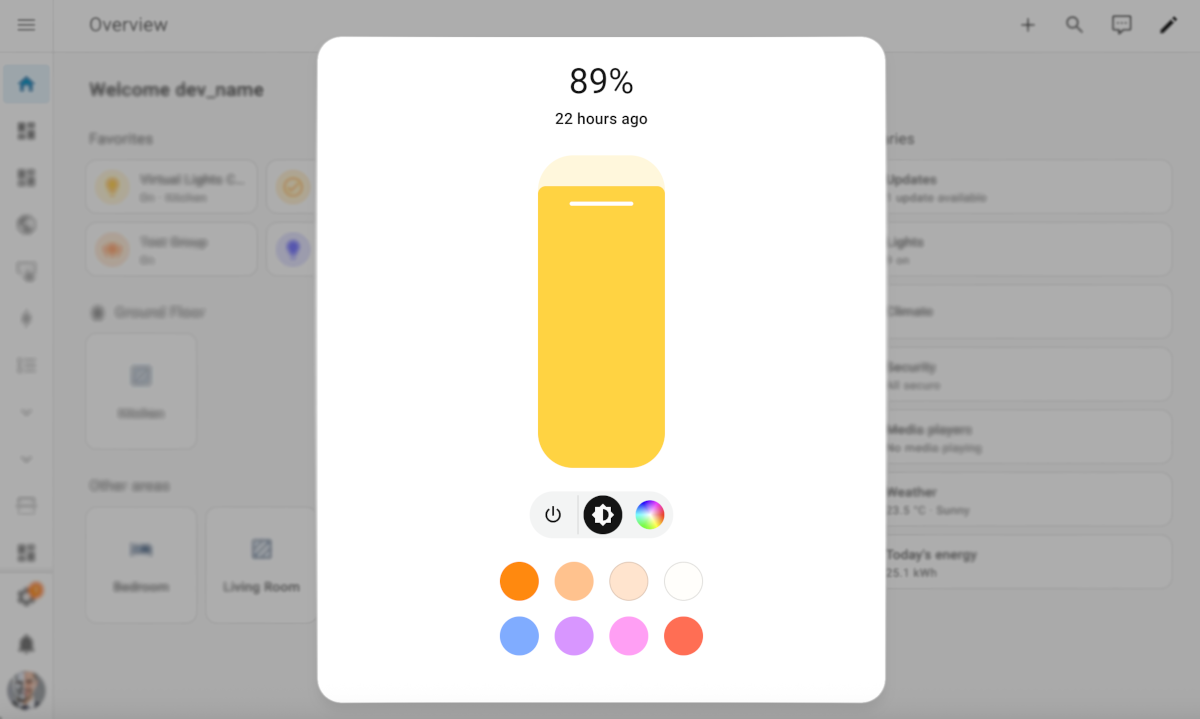
<p>Theme code hiding the more-info dialog header is shown below.</p>

<div class="language-yaml highlighter-rouge"><div class="highlight"><pre class="highlight"><code><span class="na">UIX Theme</span><span class="pi">:</span>
  <span class="na">uix-theme</span><span class="pi">:</span> <span class="s">UIX Theme</span>

  <span class="na">uix-more-info-yaml</span><span class="pi">:</span> <span class="pi">|</span>
    <span class="s">"$":</span>
      <span class="s">.: |</span>
        <span class="s">ha-bottom-sheet slot:nth-of-type(1) ha-dialog-header</span>
        <span class="s">{</span>
          <span class="s">display: none;</span>
        <span class="s">}</span>
      <span class="s">"ha-dialog $": |</span>
        <span class="s">wa-dialog slot:nth-of-type(1) ha-dialog-header {</span>
          <span class="s">display: none;</span>
        <span class="s">}</span>
</code></pre></div></div>

<div class="admonition homeassistant rounded">
    <p class="admonition-title">More-info dialog with header removed</p>
    <p>
        <p><img src="/assets/dialogs/2026-03-29-hide-more-info-header.png" alt="Screenshot of Home Assistant more-info dialog with header removed" /></p>

    </p>
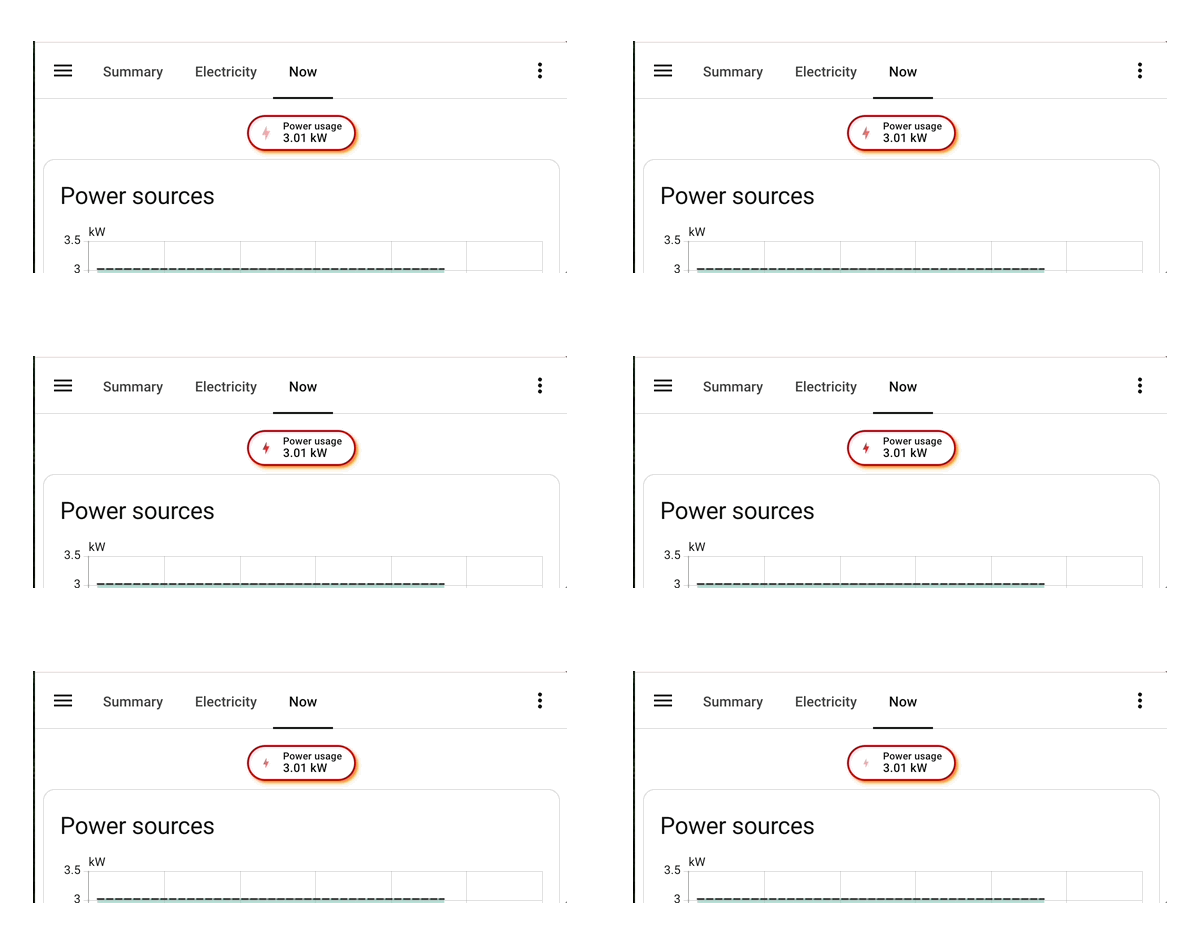
</div>]]></content><author><name>Lint-Free-Technology</name></author><category term="dialogs" /><category term="dialogs" /><summary type="html"><![CDATA[How to hide the more-info dialog header since Home Assistant 2026.3.0]]></summary></entry><entry><title type="html">Getting shadowy with themes - using host/element selector</title><link href="/elements/2026/03/29/getting-shadowy-with-themes-host-element-selector.html" rel="alternate" type="text/html" title="Getting shadowy with themes - using host/element selector" /><published>2026-03-29T00:00:00+00:00</published><updated>2026-03-29T00:00:00+00:00</updated><id>/elements/2026/03/29/getting-shadowy-with-themes-host-element-selector</id><content type="html" xml:base="/elements/2026/03/29/getting-shadowy-with-themes-host-element-selector.html"><![CDATA[<p>When using UI eXtension themes, often you can carry out all your styling by simple CSS targeting on the hosts class type. For example, see <a href="/elements/2026/03/02/energy-now-badge.html">Styling Home Assistant 2026.3 energy now badges</a> which uses a CSS target of <code class="language-plaintext highlighter-rouge">:host(.type-power-total)</code>. However this will not work if you need to target an element directly in shadow root to target a property that is not styled with a CSS variable, or to inject keyframes into an element’s light DOM.</p>

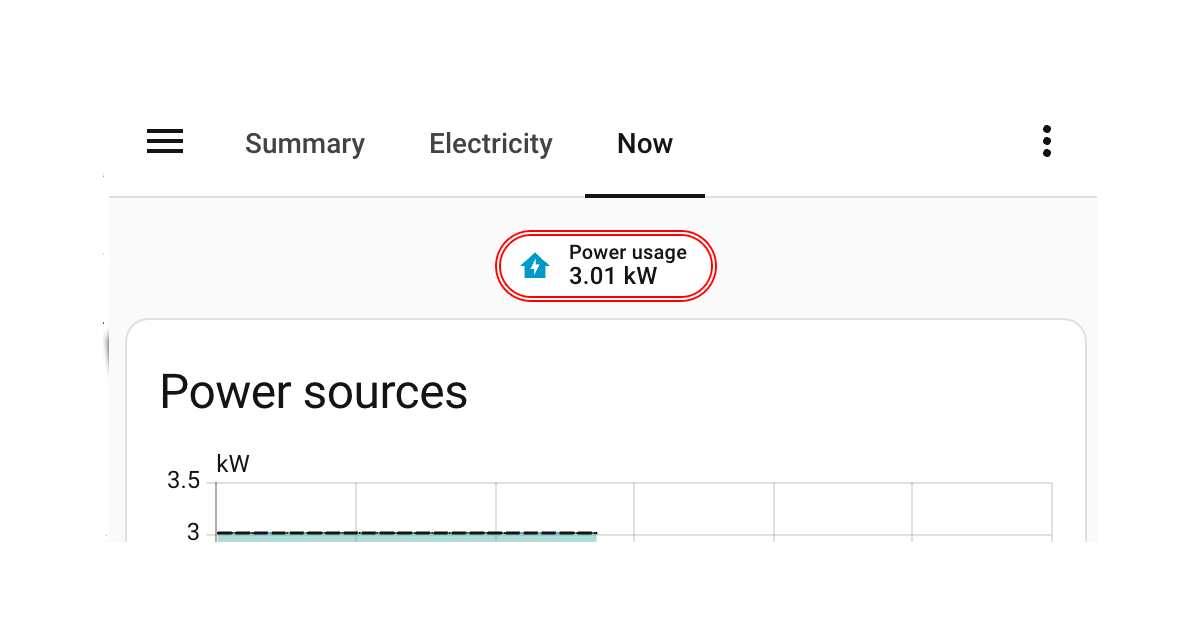
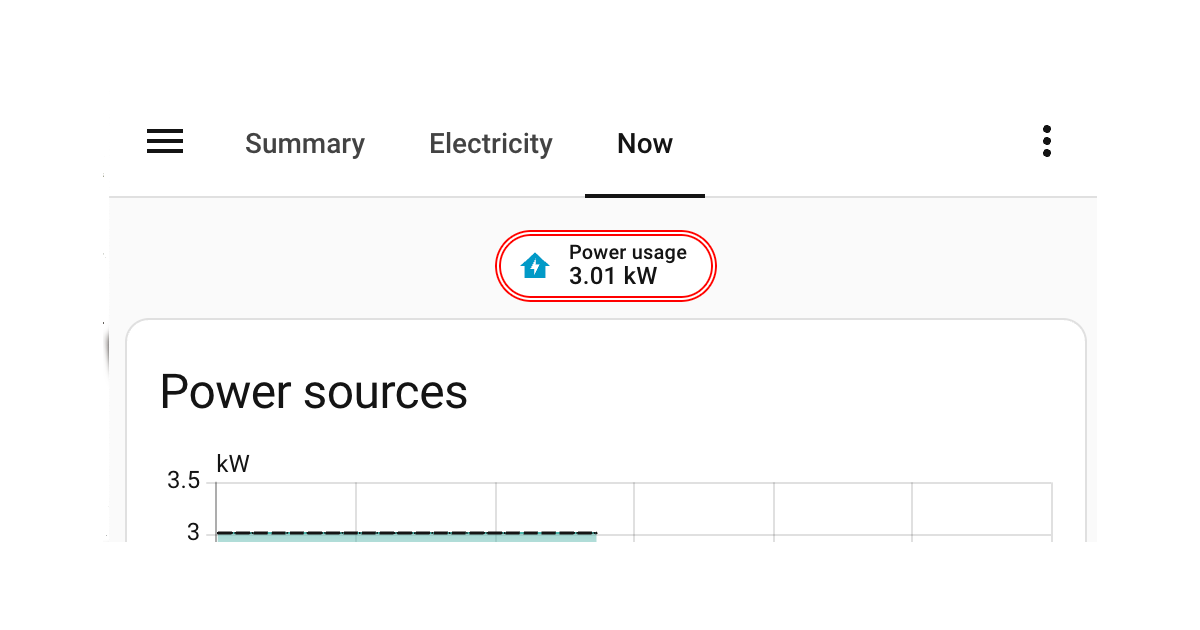
<p>Continuing to use the power now badge on the built-in energy dashboard, the example below will change the border of the badge to double. This can only be done by styling in shadow root as the <code class="language-plaintext highlighter-rouge">.badge</code> class styling does not expose a CSS variable for <code class="language-plaintext highlighter-rouge">border-style</code>. Border color and width are styled on <code class="language-plaintext highlighter-rouge">:host(.type-power-total)</code> on the root element styling key <code class="language-plaintext highlighter-rouge">.:</code>, showing a good example of using both root and specific yaml keys with UIX yaml selection.</p>

<div class="admonition info rounded">
    <p class="admonition-title">Host/element path selector</p>
    <p>
        <p>Applying this guide uses the <code class="language-plaintext highlighter-rouge">&amp;</code> <a href="https://uix.lf.technology/concepts/dom/#hostelement-path-selection">Host/element path selector</a></p>

    </p>
</div>

<div class="language-yaml highlighter-rouge"><div class="highlight"><pre class="highlight"><code><span class="na">Badge Theme</span><span class="pi">:</span>
  <span class="na">uix-theme</span><span class="pi">:</span> <span class="s">Badge Theme</span>
  <span class="na">uix-badge-yaml</span><span class="pi">:</span> <span class="pi">|</span>
    <span class="s">.: |</span>
      <span class="s">:host(.type-power-total) {</span>
        <span class="s">--ha-card-border-width: 3px;</span>
        <span class="s">--ha-card-border-color: red;</span>
      <span class="s">}</span>
    <span class="s">"&amp;.type-power-total ha-badge $": |</span>
      <span class="s">.badge {</span>
        <span class="s">border-style: double !important;</span>
      <span class="s">}</span>
</code></pre></div></div>

<div class="admonition homeassistant rounded">
    <p class="admonition-title">Styled power now badge</p>
    <p>
        <p><img src="/assets/elements/2026-03-29-getting-shadowy-with-themes-host-element-selector.png" alt="Styled power now badge" /></p>

    </p>
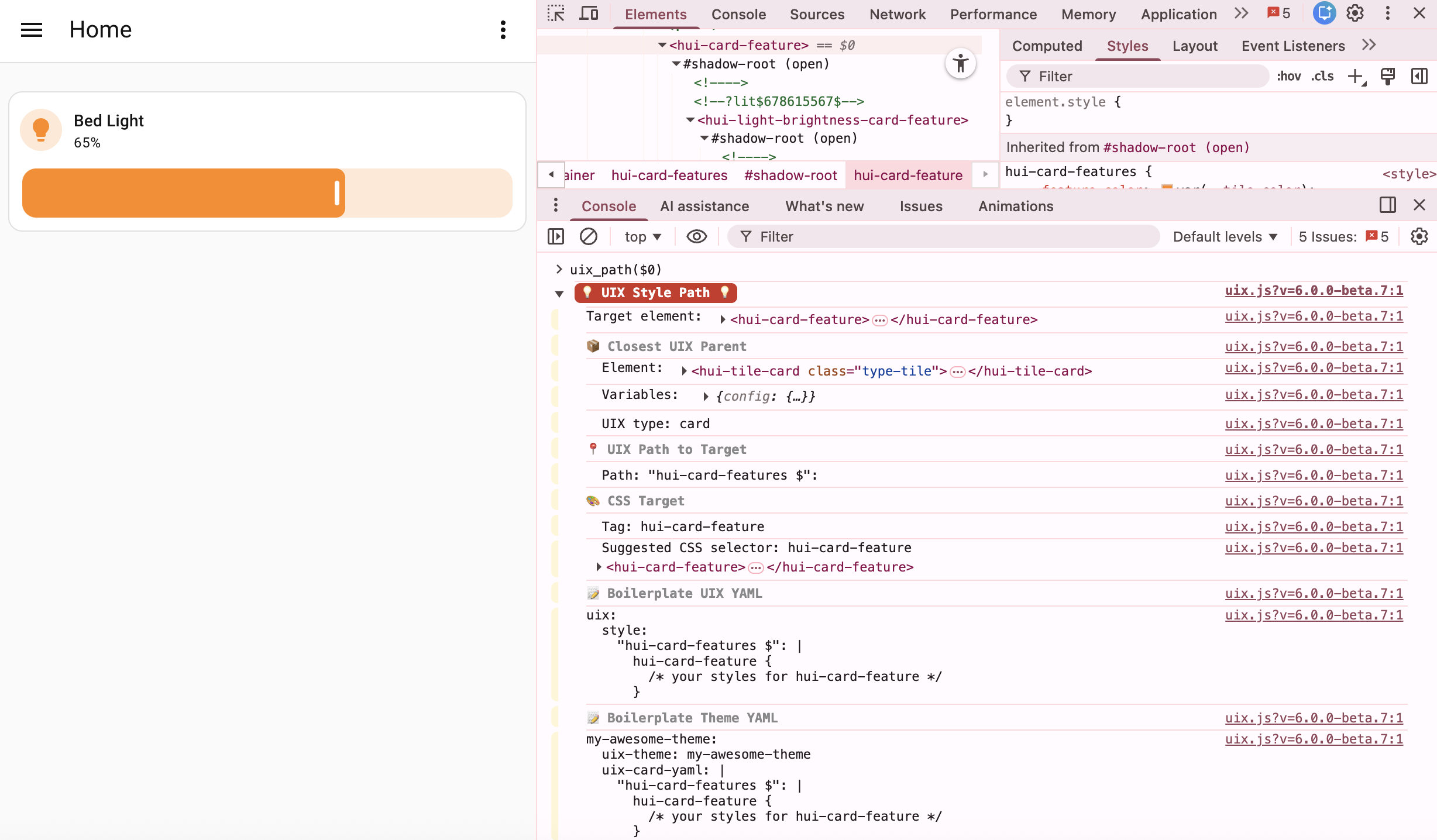
</div>]]></content><author><name>Lint-Free-Technology</name></author><category term="elements" /><category term="badge" /><category term="themes" /><summary type="html"><![CDATA[How to use host/element selector in themes to apply styling only to a specific element class type.]]></summary></entry><entry><title type="html">Tile card feature height</title><link href="/elements/2026/03/29/tile-card-feature-height.html" rel="alternate" type="text/html" title="Tile card feature height" /><published>2026-03-29T00:00:00+00:00</published><updated>2026-03-29T00:00:00+00:00</updated><id>/elements/2026/03/29/tile-card-feature-height</id><content type="html" xml:base="/elements/2026/03/29/tile-card-feature-height.html"><![CDATA[<p>Tile card features have a height which is a CSS var <code class="language-plaintext highlighter-rouge">--feature-height</code>. This is set on the feature element itself, <code class="language-plaintext highlighter-rouge">hui-card-feature</code>, which is in shadow root of <code class="language-plaintext highlighter-rouge">hui-card-features</code>. Below is a step by step guide on using <a href="https://uix.lf.technology/concepts/dom/#uix_style_path0-specific-helper"><code class="language-plaintext highlighter-rouge">uix_style_path()</code></a> to discover yaml selector to cross the shadow root for styling with UIX.</p>

<h2 id="step-1-find-feature-needing-styling">Step 1: find feature needing styling</h2>

<p>Use your browser to inspect the DOM and find the relevant feature whose height you wish to style.</p>

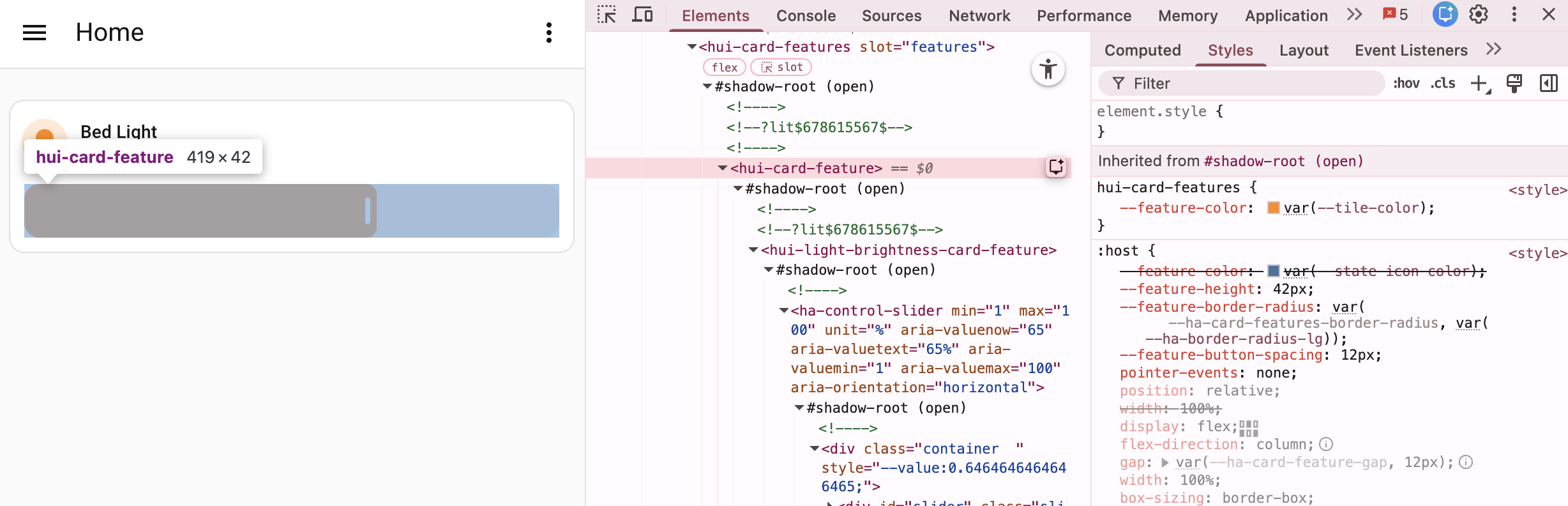
<p>The screenshot below shows <code class="language-plaintext highlighter-rouge">hui-card-feature</code> and that it indeed sets <code class="language-plaintext highlighter-rouge">--feature-height: 42px;</code>.</p>

<p><img src="/assets/elements/2026-03-29-tile-card-feature-height-1.png" alt="DOM screenshot" /></p>

<h2 id="step-2-run-uix_style_path">Step 2: run uix_style_path()</h2>

<p>With <code class="language-plaintext highlighter-rouge">hui-card-feature</code> selected in browser’s inspector, run <code class="language-plaintext highlighter-rouge">uix_style_path($0)</code> - <code class="language-plaintext highlighter-rouge">uix_path()</code> is shorthand for <code class="language-plaintext highlighter-rouge">uix_style_path()</code>.</p>

<p><img src="/assets/elements/2026-03-29-tile-card-feature-height-2.png" alt="DOM screenshot" /></p>

<h2 id="step-3a-style-tile-card-locally">Step 3a: style tile card locally</h2>

<p>From the <code class="language-plaintext highlighter-rouge">uix_style_path()</code> output take the 📝 Boilerplate UIX YAML and use to style tile card locally on dashboard.</p>

<p>📝 Boilerplate UIX YAML</p>

<div class="language-yaml highlighter-rouge"><div class="highlight"><pre class="highlight"><code><span class="na">uix</span><span class="pi">:</span>
  <span class="na">style</span><span class="pi">:</span>
    <span class="s2">"</span><span class="s">hui-card-features</span><span class="nv"> </span><span class="s">$"</span><span class="err">:</span> <span class="pi">|</span>
      <span class="s">hui-card-feature {</span>
        <span class="s">/* your styles for hui-card-feature */</span>
      <span class="s">}</span>
</code></pre></div></div>

<p>Tile card styling</p>

<div class="language-yaml highlighter-rouge"><div class="highlight"><pre class="highlight"><code><span class="na">type</span><span class="pi">:</span> <span class="s">tile</span>
<span class="na">entity</span><span class="pi">:</span> <span class="s">light.bed_light</span>
<span class="na">name</span><span class="pi">:</span>
  <span class="na">type</span><span class="pi">:</span> <span class="s">entity</span>
<span class="na">vertical</span><span class="pi">:</span> <span class="kc">false</span>
<span class="na">features_position</span><span class="pi">:</span> <span class="s">bottom</span>
<span class="na">grid_options</span><span class="pi">:</span>
  <span class="na">columns</span><span class="pi">:</span> <span class="m">12</span>
  <span class="na">rows</span><span class="pi">:</span> <span class="m">1</span>
<span class="na">features</span><span class="pi">:</span>
  <span class="pi">-</span> <span class="na">type</span><span class="pi">:</span> <span class="s">light-brightness</span>
<span class="na">uix</span><span class="pi">:</span> <span class="c1"># Included from Boilerplate UIX YAML, filling in desired styling</span>
  <span class="na">style</span><span class="pi">:</span>
    <span class="s2">"</span><span class="s">hui-card-features</span><span class="nv"> </span><span class="s">$"</span><span class="err">:</span> <span class="pi">|</span>
      <span class="s">hui-card-feature {</span>
        <span class="s">--feature-height: 20px;</span>
      <span class="s">}</span>
</code></pre></div></div>

<h2 id="step-3b-style-tile-card-via-theme">Step 3b: style tile card via theme</h2>

<p>From the <code class="language-plaintext highlighter-rouge">uix_style_path()</code> output take the 📝 Boilerplate Theme YAML and use to create a new theme or add to an existing theme already set up for UIX styling. If you already have a theme you would just take the <code class="language-plaintext highlighter-rouge">uix-card-yaml:</code> section.</p>

<div class="admonition tip rounded">
    <p class="admonition-title">Merging UIX styling</p>
    <p>
        <p>If you already have <code class="language-plaintext highlighter-rouge">uix-card:</code> theme section and need to migrate to <code class="language-plaintext highlighter-rouge">uix-card-yaml</code> you need to place any existing under the root key <code class="language-plaintext highlighter-rouge">.:</code>. For more information see <a href="https://uix.lf.technology/using/themes/#updating-uix-thing-variable-to-uix-thing-yaml-variable">Updating uix-&lt;thing&gt; variable to uix-&lt;thing&gt;-yaml variable</a></p>

    </p>
</div>

<p>📝 Boilerplate Theme YAML</p>

<div class="language-yaml highlighter-rouge"><div class="highlight"><pre class="highlight"><code><span class="na">my-awesome-theme</span><span class="pi">:</span>
  <span class="na">uix-theme</span><span class="pi">:</span> <span class="s">my-awesome-theme</span>
  <span class="na">uix-card-yaml</span><span class="pi">:</span> <span class="pi">|</span>
    <span class="s">"hui-card-features $": |</span>
      <span class="s">hui-card-feature {</span>
        <span class="s">/* your styles for hui-card-feature */</span>
      <span class="s">}</span>
</code></pre></div></div>

<p>Theme styling in existing theme</p>

<div class="language-yaml highlighter-rouge"><div class="highlight"><pre class="highlight"><code><span class="na">UIX Test</span><span class="pi">:</span>
  <span class="na">uix-theme</span><span class="pi">:</span> <span class="s">UIX Test</span>

  <span class="na">uix-card-yaml</span><span class="pi">:</span> <span class="pi">|</span>
    <span class="s">"hui-card-features $": |</span>
      <span class="s">hui-card-feature {</span>
        <span class="s">--feature-height: 20px;</span>
      <span class="s">}</span>
</code></pre></div></div>

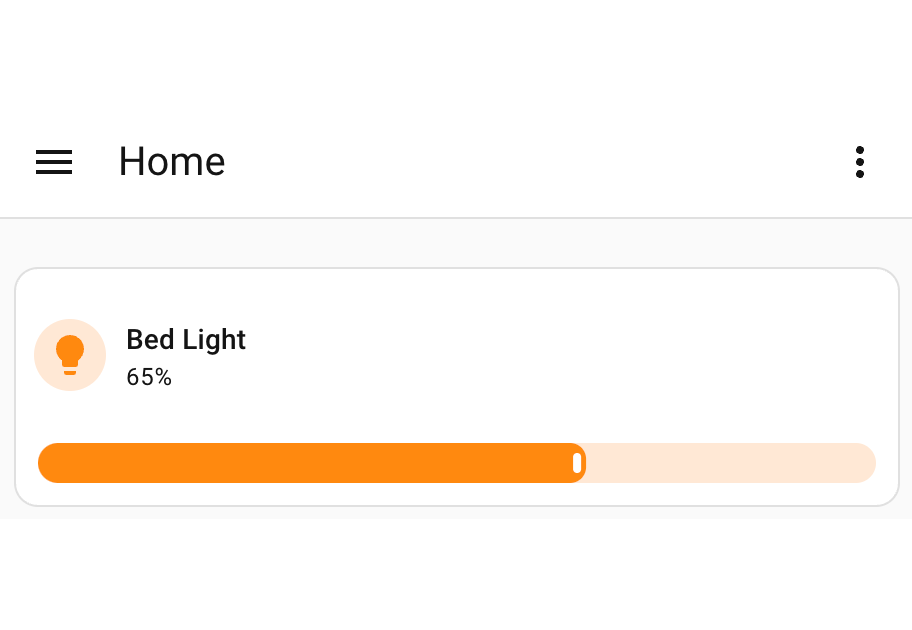
<div class="admonition homeassistant rounded">
    <p class="admonition-title">Styled tile card feature height</p>
    <p>
        <p><img src="/assets/elements/2026-03-29-tile-card-feature-height.png" alt="Styled tile card feature height" /></p>

    </p>
</div>]]></content><author><name>Lint-Free-Technology</name></author><category term="elements" /><category term="tile" /><category term="card" /><category term="themes" /><category term="uix_path" /><summary type="html"><![CDATA[Styling tile card feature height. A guide on using uix_path() for finding yaml paths for styling locally and using themes.]]></summary></entry><entry><title type="html">Getting shadowy with themes - using templates</title><link href="/elements/2026/03/03/getting-shadowy-with-themes.html" rel="alternate" type="text/html" title="Getting shadowy with themes - using templates" /><published>2026-03-03T00:00:00+00:00</published><updated>2026-03-03T00:00:00+00:00</updated><id>/elements/2026/03/03/getting-shadowy-with-themes</id><content type="html" xml:base="/elements/2026/03/03/getting-shadowy-with-themes.html"><![CDATA[<div class="admonition tip rounded">
    <p class="admonition-title">Host/element selector</p>
    <p>
        <p>To save using a template just for type you can use the alternate method using <a href="/elements/2026/03/29/getting-shadowy-with-themes-host-element-selector.html">Host/element selector</a></p>

    </p>
</div>

<p>When using UI eXtension themes, often you can carry out all your styling by simple CSS targeting on the hosts class type. For example, see <a href="/elements/2026/03/02/energy-now-badge.html">Styling Home Assistant 2026.3 energy now badges</a> which uses a CSS target of <code class="language-plaintext highlighter-rouge">:host(.type-power-total)</code>. However this will not work if you need to target an element directly in shadow root to target a property that is not styled with a CSS variable, or to inject keyframes into an element’s light DOM.</p>

<p>Continuing to use the power now badge on the built-in energy dashboard, the example below will change the border of the badge to double. This can only be done by styling in shadow root as the <code class="language-plaintext highlighter-rouge">.badge</code> class styling does not expose a CSS variable for <code class="language-plaintext highlighter-rouge">border-style</code>. Border color and width are styled on <code class="language-plaintext highlighter-rouge">:host(.type-power-total)</code> on the root element styling key <code class="language-plaintext highlighter-rouge">.:</code>, showing a good example of using both root and specific yaml keys with UIX yaml selection.</p>

<div class="admonition tip rounded">
    <p class="admonition-title">Config variable in templates</p>
    <p>
        <p>Every UIX template includes the variable <code class="language-plaintext highlighter-rouge">config</code> which is the element’s config. In all but very few cases, the config will include at least the element <code class="language-plaintext highlighter-rouge">type</code> as well as any user or strategy config. For this example, <code class="language-plaintext highlighter-rouge">config.type == 'power-total'</code></p>

    </p>
</div>

<div class="language-yaml highlighter-rouge"><div class="highlight"><pre class="highlight"><code><span class="na">Badge Theme</span><span class="pi">:</span>
  <span class="na">uix-theme</span><span class="pi">:</span> <span class="s">Badge Theme</span>
  <span class="na">uix-badge-yaml</span><span class="pi">:</span> <span class="pi">|</span>
    <span class="s">.: |</span>
      <span class="s">:host(.type-power-total) {</span>
        <span class="s">--ha-card-border-width: 3px;</span>
        <span class="s">--ha-card-border-color: red;</span>
      <span class="s">}</span>
    <span class="s">ha-badge $: |</span>
      <span class="s">{% if config.type == 'power-total' %}</span>
      <span class="s">.badge {</span>
        <span class="s">border-style: double !important;</span>
      <span class="s">}</span>
      <span class="s">{% endif %}</span>
</code></pre></div></div>

<div class="admonition homeassistant rounded">
    <p class="admonition-title">Styled power now badge</p>
    <p>
        <p><img src="/assets/elements/2026-03-03-getting-shadowy-with-themes.png" alt="Styled power now badge" /></p>

    </p>
</div>]]></content><author><name>Lint-Free-Technology</name></author><category term="elements" /><category term="badge" /><category term="themes" /><category term="templates" /><summary type="html"><![CDATA[How to use templates in themes to apply styling only to a specific element config type.]]></summary></entry><entry><title type="html">Custom CSS variables</title><link href="/elements/2026/03/02/css-vars-entities.html" rel="alternate" type="text/html" title="Custom CSS variables" /><published>2026-03-02T00:00:00+00:00</published><updated>2026-03-02T00:00:00+00:00</updated><id>/elements/2026/03/02/css-vars-entities</id><content type="html" xml:base="/elements/2026/03/02/css-vars-entities.html"><![CDATA[<p>UI eXtension (UIX) templates are confined to a set of style rules, either the default style (string or <code class="language-plaintext highlighter-rouge">.:</code> key) or child style. There is no concept of variable sharing across templates, and it would be too inefficient for this to be coded into UIX with lots of tracking and regeneration of template to the backend when variables change.</p>

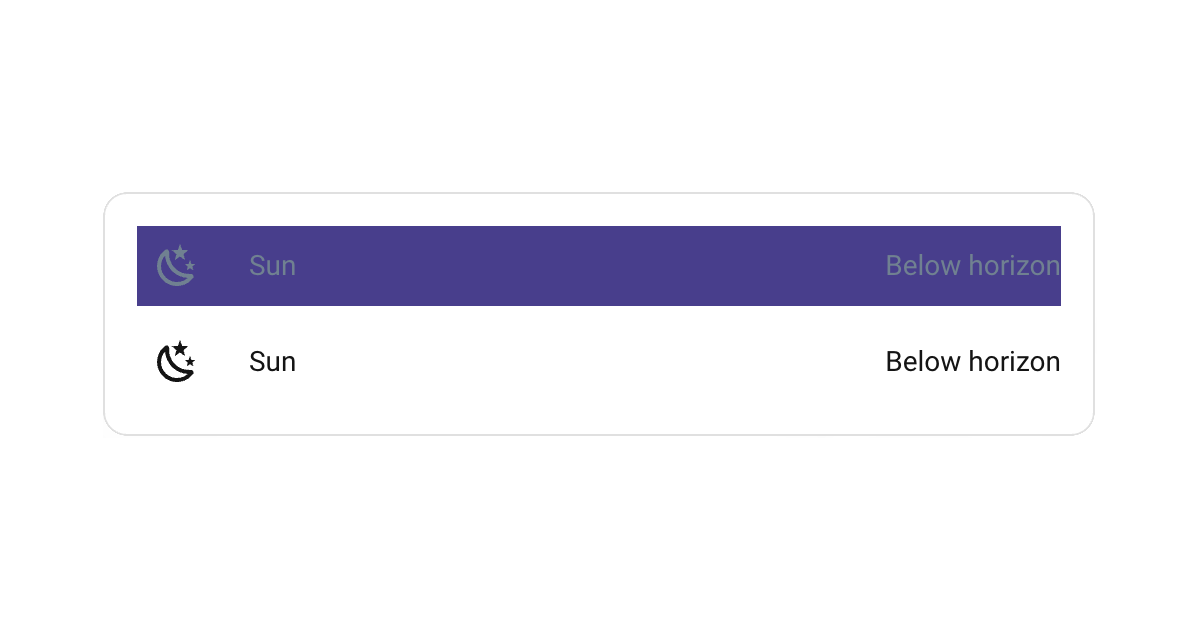
<p>Consider the following where you may wish to use a concept of <code class="language-plaintext highlighter-rouge">isDark</code> across multiple entities rows, but not all rows.</p>

<div class="language-yaml highlighter-rouge"><div class="highlight"><pre class="highlight"><code><span class="na">type</span><span class="pi">:</span> <span class="s">entities</span>
<span class="na">entities</span><span class="pi">:</span>
  <span class="pi">-</span> <span class="na">entity</span><span class="pi">:</span> <span class="s">sun.sun</span>
    <span class="na">uix</span><span class="pi">:</span>
      <span class="na">style</span><span class="pi">:</span> <span class="pi">|</span>
        <span class="s">{% set isDark = is_state('sun.sun','below_horizon') %}</span>
        <span class="s">hui-generic-entity-row {</span>
          <span class="s">background: {{ 'darkslateblue' if isDark else 'inherit' }};</span>
          <span class="s">color: {{ 'slategrey' if isDark else 'inherit' }};</span>
          <span class="s">--state-icon-color: {{ 'slategrey' if isDark else 'inherit' }};</span>
        <span class="s">}</span>
  <span class="pi">-</span> <span class="na">entity</span><span class="pi">:</span> <span class="s">sun.sun</span>
    <span class="na">uix</span><span class="pi">:</span>
      <span class="na">style</span><span class="pi">:</span> <span class="pi">|</span>
        <span class="s">{% set isDark = is_state('sun.sun','below_horizon') %}</span>
        <span class="s">hui-generic-entity-row {</span>
          <span class="s">background: {{ 'yellow' if not isDark else 'inherit' }};</span>
          <span class="s">color: {{ 'orange' if not isDark else 'inherit' }};</span>
          <span class="s">--state-icon-color: {{ 'orange' if not isDark else 'inherit' }};</span>
        <span class="s">}</span>
</code></pre></div></div>

<p>The <code class="language-plaintext highlighter-rouge">isDark</code> calculation here is pretty simple. However, repeating what may be a complex template calculation twice can be quite repetitive and prone to error when you need to adjust.</p>

<p>One method to simplify this, and make it better, uses custom CSS variables on <code class="language-plaintext highlighter-rouge">:host</code> reducing the templates used from two to one.</p>

<div class="language-yaml highlighter-rouge"><div class="highlight"><pre class="highlight"><code><span class="na">type</span><span class="pi">:</span> <span class="s">entities</span>
<span class="na">uix</span><span class="pi">:</span>
  <span class="na">style</span><span class="pi">:</span> <span class="pi">|</span>
    <span class="s">:host {</span>
      <span class="s">{% set isDark = is_state('sun.sun','below_horizon') %}</span>
      <span class="s">--darkslateblue-if-dark: {{ 'darkslateblue' if isDark else 'inherit' }};</span>
      <span class="s">--slategrey-if-dark: {{ 'slategrey' if isDark else 'inherit' }};</span>
      <span class="s">--yellow-if-not-dark: {{ 'yellow' if not isDark else 'inherit' }};</span>
      <span class="s">--orange-if-not-dark: {{ 'orange' if not isDark else 'inherit' }};</span>
    <span class="s">}</span>
<span class="na">entities</span><span class="pi">:</span>
  <span class="pi">-</span> <span class="na">entity</span><span class="pi">:</span> <span class="s">sun.sun</span>
    <span class="na">uix</span><span class="pi">:</span>
      <span class="na">style</span><span class="pi">:</span> <span class="pi">|</span>
        <span class="s">hui-generic-entity-row {</span>
          <span class="s">background: var(--darkslateblue-if-dark);</span>
          <span class="s">color: var(--slategrey-if-dark);</span>
          <span class="s">--state-icon-color: var(--slategrey-if-dark);</span>
        <span class="s">}</span>
  <span class="pi">-</span> <span class="na">entity</span><span class="pi">:</span> <span class="s">sun.sun</span>
    <span class="na">uix</span><span class="pi">:</span>
      <span class="na">style</span><span class="pi">:</span> <span class="pi">|</span>
        <span class="s">hui-generic-entity-row {</span>
          <span class="s">background: var(--yellow-if-not-dark);</span>
          <span class="s">color: var(--orange-if-not-dark);</span>
          <span class="s">--state-icon-color: var(--orange-if-not-dark);</span>
        <span class="s">}</span>
</code></pre></div></div>

<div class="admonition homeassistant rounded">
    <p class="admonition-title">Style entities rows using custom CSS variables</p>
    <p>
        <p><img src="/assets/elements/2026-03-02-css-vars-entities.png" alt="Styled entities rows" /></p>

    </p>
</div>]]></content><author><name>Lint-Free-Technology</name></author><category term="elements" /><category term="entities" /><category term="card" /><category term="templates" /><summary type="html"><![CDATA[Using custom CSS variables to reduce repetition in your templates]]></summary></entry><entry><title type="html">Styling Home Assistant 2026.3 energy now badges</title><link href="/elements/2026/03/02/energy-now-badge.html" rel="alternate" type="text/html" title="Styling Home Assistant 2026.3 energy now badges" /><published>2026-03-02T00:00:00+00:00</published><updated>2026-03-02T00:00:00+00:00</updated><id>/elements/2026/03/02/energy-now-badge</id><content type="html" xml:base="/elements/2026/03/02/energy-now-badge.html"><![CDATA[<p>Home Assistant 2026.3 introduces 3 new energy badge types used in the built-in energy dashboard. These are <code class="language-plaintext highlighter-rouge">power-total</code>, <code class="language-plaintext highlighter-rouge">gas-total</code> and <code class="language-plaintext highlighter-rouge">water-total</code>. To style these on the built-in energy dashboard you need to use a UIX theme.</p>

<p>Home Assistant badges use <code class="language-plaintext highlighter-rouge">ha-badge</code> in shadow root. <code class="language-plaintext highlighter-rouge">ha-badge</code> uses many styling vars so most styling can be done on <code class="language-plaintext highlighter-rouge">:host</code>. See <code class="language-plaintext highlighter-rouge">.badge</code> <a href="https://github.com/home-assistant/frontend/blob/fbd0409837c1f2ad7b897df6cf2a4d7170f4bcec/src/components/ha-badge.ts#L45">styles</a> in Frontend GitHub. The energy badges use <code class="language-plaintext highlighter-rouge">ha-svg-icon</code> directly as a slotted element so this is also easy to style with UIX (5.1.0+).</p>

<div class="admonition tip rounded">
    <p class="admonition-title">UIX class selection in themes</p>
    <p>
        <p>When using UIX themes on an element like a badge, your CSS can easily target the element itself by class, e.g. <code class="language-plaintext highlighter-rouge">:host(.type-power-total)</code>. However, if you need to go into the shadow root with a YAML selector, specific targeting will be difficult without a template. To use a template to help with targeting your CSS rules, use the <code class="language-plaintext highlighter-rouge">config</code> variable and check <code class="language-plaintext highlighter-rouge">config.type</code>, e.g. <code class="language-plaintext highlighter-rouge">power-total</code>. Look out for a future post showing this concept for templates.</p>

    </p>
</div>

<p>The theme example below uses <code class="language-plaintext highlighter-rouge">.badge</code> CSS vars to change the border width, color and badge box-shadow. The icon color is changed to red and is given a pulse animation.</p>

<div class="language-yaml highlighter-rouge"><div class="highlight"><pre class="highlight"><code><span class="na">Badge Theme</span><span class="pi">:</span>
  <span class="na">uix-theme</span><span class="pi">:</span> <span class="s">Badge Theme</span>
  <span class="na">uix-badge</span><span class="pi">:</span> <span class="pi">|</span>
      <span class="s">:host(.type-power-total) {</span>
        <span class="s">--ha-card-border-width: 2px;</span>
        <span class="s">--ha-card-border-color: red;</span>
        <span class="s">--ha-card-box-shadow: 2px 2px 2px orange;</span>
      <span class="s">}</span>
      <span class="s">ha-svg-icon {</span>
        <span class="s">color: red;</span>
        <span class="s">animation: 1.5s pulse infinite linear;</span>
        <span class="s">--uix-icon: mdi:lightning-bolt;</span>
      <span class="s">}</span>
      <span class="s">@keyframes pulse {</span>
        <span class="s">0% {</span>
            <span class="s">opacity: 0;</span>
            <span class="s">transform: scale(0.5);</span>
        <span class="s">}</span>
        <span class="s">50% {</span>
            <span class="s">opacity: 1;</span>
        <span class="s">}</span>
        <span class="s">100% {</span>
            <span class="s">opacity: 0;</span>
        <span class="s">}</span>
      <span class="s">}</span>
</code></pre></div></div>

<div class="admonition homeassistant rounded">
    <p class="admonition-title">Styled output</p>
    <p>
        <p><img src="/assets/elements/2026-03-02-energy-now-badge.gif" alt="Styled energy now badges output" /></p>

    </p>
</div>]]></content><author><name>Lint-Free-Technology</name></author><category term="elements" /><category term="energy" /><category term="badge" /><summary type="html"><![CDATA[Style the energy now badges introduced in Home Assistant 2026.3: power, gas, water.]]></summary></entry><entry><title type="html">Styling dialogs with UI eXtension</title><link href="/dialogs/2026/02/27/styling-dialogs.html" rel="alternate" type="text/html" title="Styling dialogs with UI eXtension" /><published>2026-02-27T00:00:00+00:00</published><updated>2026-02-27T00:00:00+00:00</updated><id>/dialogs/2026/02/27/styling-dialogs</id><content type="html" xml:base="/dialogs/2026/02/27/styling-dialogs.html"><![CDATA[<p>Home Assistant uses a dialog manager through which most dialogs are shown. UIX patches through the <code class="language-plaintext highlighter-rouge">showDialog()</code> method to allow styling dialogs via UIX theme.</p>

<div class="admonition info rounded">
    <p class="admonition-title">Other dialog guides</p>
    <p>
        <p>You can check out all dialog guides via the <a href="/categories.html#h-dialogs">dialog category</a>.</p>

    </p>
</div>

<p>As there are many different types of dialogs, UIX guides will not be able to cover all dialogs so this guide will lead you through inspecting the DOM to discover more about the dialog you wish to style, and leading you through when to use a template to target the dialog specifically.</p>

<div class="admonition example rounded">
    <p class="admonition-title">DOM example</p>
    <p>
        <p><img src="/assets/dialogs/2026-02-27-styling-dialogs-1.png" alt="DOM example" /></p>

    </p>
</div>

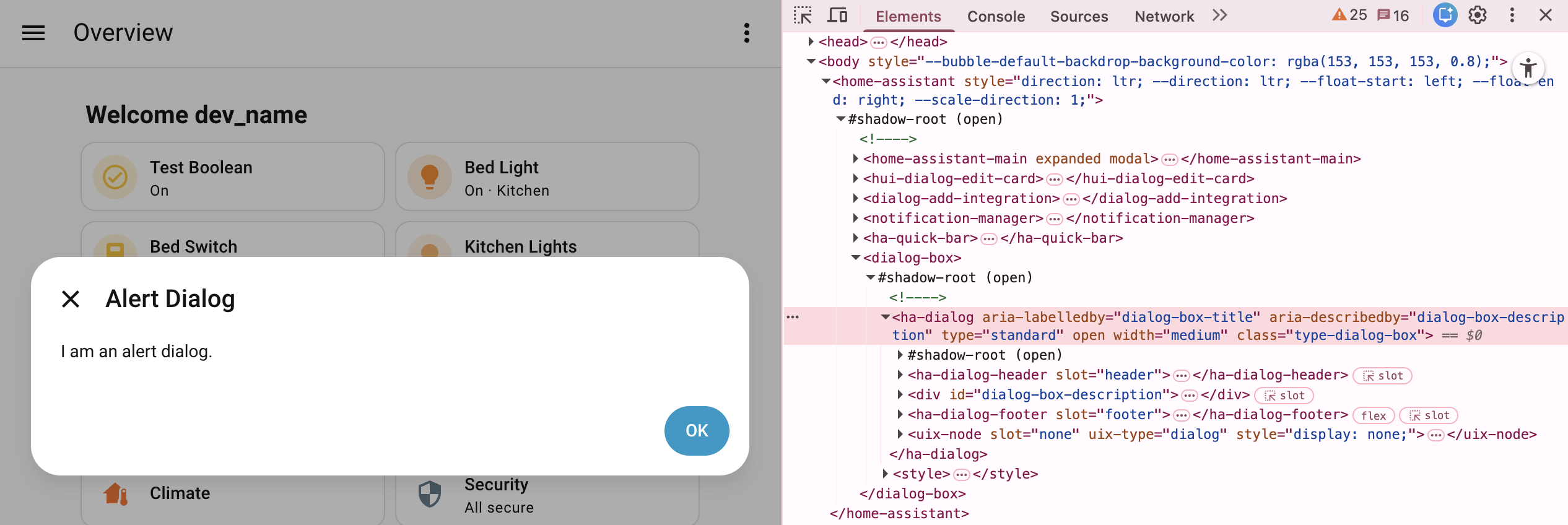
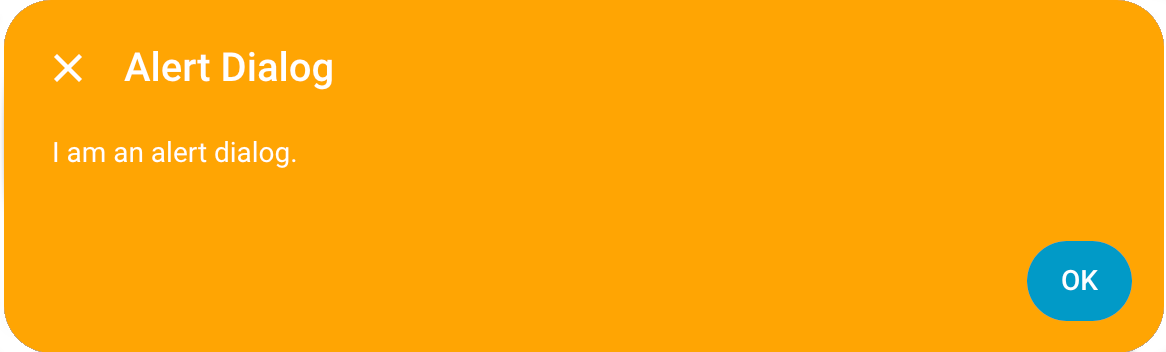
<p>Above you will see an example of an alert dialog from Home Assistant 2026.3+. Dialogs managed by Home Assistant’s dialog manager will always be the last child element of the shadowRoot of <code class="language-plaintext highlighter-rouge">&lt;home-assistant&gt;</code>. The outer element will be the dialog parent element, which for the alert dialog example is the generic Home Assistant <code class="language-plaintext highlighter-rouge">&lt;dialog-box&gt;</code>. Generally dialogs will use a shadowRoot under which there will be the dialog element, usually either <code class="language-plaintext highlighter-rouge">&lt;ha-dialog&gt;</code> or <code class="language-plaintext highlighter-rouge">&lt;ha-adaptive-dialog&gt;</code>. It is this level which UIX is patched and applied for dialogs.</p>

<p>Basic styling can be done to the dialog element, in the alert example this is <code class="language-plaintext highlighter-rouge">ha-dialog</code>. As the dialog patch is universal, you are best to use the UIX type class to scope your styling, which is <code class="language-plaintext highlighter-rouge">type-dialog-box</code> in the alert example.</p>

<h2 id="basic-example">Basic example</h2>

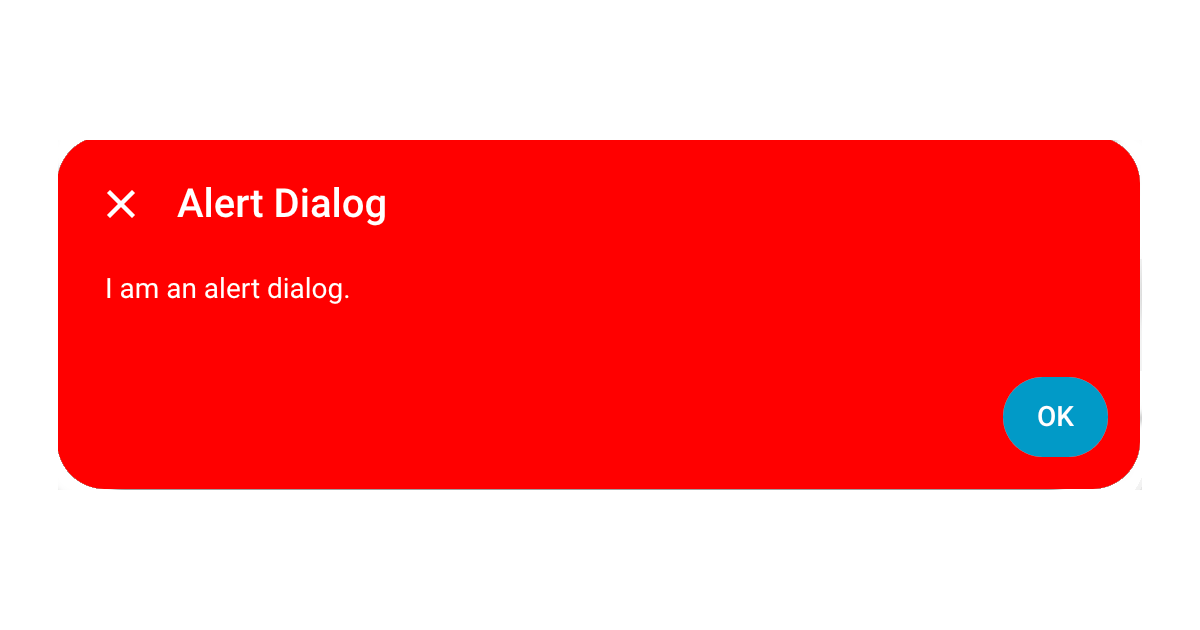
<p>Below is theme yaml code to make the dialog background red and the text white. Yaml selectors are used as you will generally need to go to the dialog element shadowRoot when styling dialogs.</p>

<div class="language-yaml highlighter-rouge"><div class="highlight"><pre class="highlight"><code><span class="na">UIX Theme</span><span class="pi">:</span>
  <span class="na">uix-theme</span><span class="pi">:</span> <span class="s">UIX Theme</span>
  <span class="na">uix-dialog-yaml</span><span class="pi">:</span> <span class="pi">|</span>
    <span class="s">.: |</span>
      <span class="s">ha-dialog.type-dialog-box {</span>
        <span class="s">--card-background-color: red;</span>
        <span class="s">--primary-text-color: white;</span>
      <span class="s">}</span>
</code></pre></div></div>

<div class="admonition homeassistant rounded">
    <p class="admonition-title">Styled dialog</p>
    <p>
        <p><img src="/assets/dialogs/2026-02-27-styling-dialogs.png" alt="Styled dialog" /></p>

    </p>
</div>

<h2 id="template-example">Template example</h2>

<p>The <a href="#basic-example">basic example</a> for an alert dialog will style all dialogs of UIX class <code class="language-plaintext highlighter-rouge">type-dialog-box</code>. This is the generic Home Assistant dialog and covers many dialogs including alerts and confirmation dialogs. If you wish to scope your styling to a specific dialog, you will need to template your styling, taking advantage of <code class="language-plaintext highlighter-rouge">params</code> variable which will be available in the template.</p>

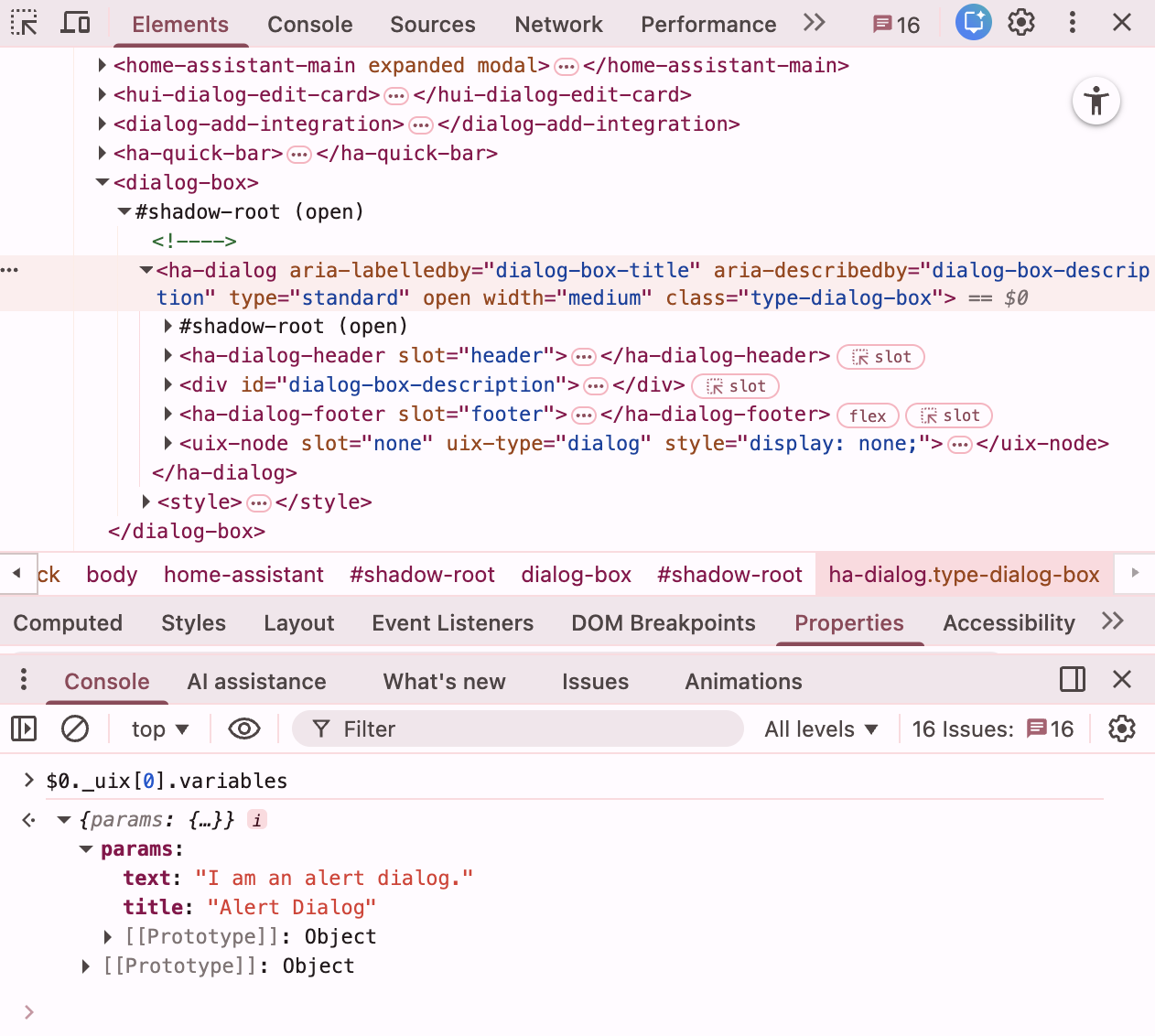
<p>Your can view the <code class="language-plaintext highlighter-rouge">params</code> available for the dialog using your browser’s element inspector and console. With the dialog element, in the alert example <code class="language-plaintext highlighter-rouge">ha-dialog</code> selected, type the following code to see the UIX variables, which includes <code class="language-plaintext highlighter-rouge">params</code>.</p>

<div class="language-console highlighter-rouge"><div class="highlight"><pre class="highlight"><code><span class="gp">$</span>0._uix[0].variables
</code></pre></div></div>

<div class="admonition example rounded">
    <p class="admonition-title">Dialog params</p>
    <p>
        <p><img src="/assets/dialogs/2026-02-27-styling-dialogs-2.png" alt="Dialog params" /></p>

    </p>
</div>

<p>Knowing <code class="language-plaintext highlighter-rouge">params</code> which are available you can make a template to target this alert dialog by title.</p>

<div class="admonition tip rounded">
    <p class="admonition-title">Dialog text</p>
    <p>
        <p>An important tip to note is that dialog text is <strong>after</strong> localization. Localization keys are not available as the localization is done before the dialog is called.</p>

    </p>
</div>

<div class="language-yaml highlighter-rouge"><div class="highlight"><pre class="highlight"><code><span class="na">UIX Theme</span><span class="pi">:</span>
  <span class="na">uix-theme</span><span class="pi">:</span> <span class="s">UIX Theme</span>
  <span class="na">uix-dialog-yaml</span><span class="pi">:</span> <span class="pi">|</span>
    <span class="s">.: |</span>
      <span class="s">ha-dialog.type-dialog-box {</span>
        <span class="s">--card-background-color: red;</span>
        <span class="s">--primary-text-color: white;</span>
      <span class="s">}</span>
      <span class="s">{% set titleText = params.title if 'title' in params else '' %}</span>
      <span class="s">{% if titleText == 'Alert Dialog' %}</span>
      <span class="s">ha-dialog.type-dialog-box {</span>
        <span class="s">--card-background-color: orange !important;</span>
      <span class="s">}</span>
      <span class="s">{% endif %}</span>
</code></pre></div></div>

<div class="admonition homeassistant rounded">
    <p class="admonition-title">Styled dialog</p>
    <p>
        <p><img src="/assets/dialogs/2026-02-27-styling-dialogs-3.png" alt="Styled dialog" /></p>

    </p>
</div>

<h2 id="vertical-centering">Vertical centering</h2>

<p><code class="language-plaintext highlighter-rouge">ha-dialog</code> uses <code class="language-plaintext highlighter-rouge">wa-dialog</code> which in turn uses the browser’s <code class="language-plaintext highlighter-rouge">&lt;dialog&gt;</code> element. The only way the <code class="language-plaintext highlighter-rouge">&lt;dialog&gt;</code> element can be adjusted vertically is to use <code class="language-plaintext highlighter-rouge">--dialog-surface-margin-top</code>. By default this is set to <code class="language-plaintext highlighter-rouge">auto</code>. If you wish to have the dialog 40px from the top, like <code class="language-plaintext highlighter-rouge">more-info</code> dialog, you can set <code class="language-plaintext highlighter-rouge">--dialog-surface-margin-top: 40px</code>.</p>

<div class="language-yaml highlighter-rouge"><div class="highlight"><pre class="highlight"><code><span class="na">UIX Theme</span><span class="pi">:</span>
  <span class="na">uix-theme</span><span class="pi">:</span> <span class="s">UIX Theme</span>
  <span class="na">uix-dialog-yaml</span><span class="pi">:</span> <span class="pi">|</span>
    <span class="s">.: |</span>
      <span class="s">ha-dialog.type-dialog-box {</span>
        <span class="s">--dialog-surface-margin-top: 40px;</span>
      <span class="s">}</span>
</code></pre></div></div>

<h2 id="using-shadow-dom">Using shadow DOM</h2>

<p>Most dialog styling can be done using CSS vars that pierce shadowRoot. However some stylings need to carries out on <code class="language-plaintext highlighter-rouge">wa-dialog</code> which is in shadowRoot. Below are examples to get you started.</p>

<h3 id="move-to-bottom">Move to bottom</h3>

<p>To move a dialog to bottom you need to set <code class="language-plaintext highlighter-rouge">top: unset</code>, <code class="language-plaintext highlighter-rouge">bottom: 0</code> of the actual <code class="language-plaintext highlighter-rouge">dialog</code> element used by <code class="language-plaintext highlighter-rouge">wa-dialog</code>.</p>

<div class="language-yaml highlighter-rouge"><div class="highlight"><pre class="highlight"><code><span class="na">UIX Theme</span><span class="pi">:</span>
  <span class="na">uix-theme</span><span class="pi">:</span> <span class="s">UIX Theme</span>
  <span class="na">uix-dialog-yaml</span><span class="pi">:</span> <span class="pi">|</span>
    <span class="s">$ wa-dialog $: |</span>
      <span class="s">dialog {</span>
        <span class="s">margin-top: 0 !important;</span>
        <span class="s">top: unset !important;</span>
        <span class="s">bottom: 0 !important;</span>
        <span class="s">margin-bottom: 20px !important;</span>
      <span class="s">}</span>
</code></pre></div></div>

<h3 id="slide-in-or-other-animations">Slide-in or other animations</h3>

<p>Animations can be slightly problematic for wa-dialog as it has its own animation for show/hide (and pulse if dismiss is blocked). Setting animation times to 0 mostly solves this but you may see the popup briefly before animation.</p>

<p>The following is generally working well.</p>

<div class="language-yaml highlighter-rouge"><div class="highlight"><pre class="highlight"><code><span class="na">UIX Theme</span><span class="pi">:</span>
  <span class="na">uix-theme</span><span class="pi">:</span> <span class="s">UIX Theme</span>
  <span class="na">uix-dialog-yaml</span><span class="pi">:</span> <span class="pi">|</span>
    <span class="s">.: |</span>
      <span class="s">ha-dialog {</span>
        <span class="s">--dialog-surface-margin-top: auto !important; /* vertically centered */</span>
        <span class="s">--ha-dialog-show-duration: 0;</span>
        <span class="s">--ha-dialog-hide-duration: 0;</span>
      <span class="s">}</span>
    <span class="s">$ wa-dialog $: |</span>
      <span class="s">@keyframes slide-in { from { transform:translateX(100%) } to {</span>
      <span class="s">transform: translateX(0); } }</span>

      <span class="s">dialog {</span>
        <span class="s">animation: slide-in 0.3s forwards;</span>
      <span class="s">}</span>
</code></pre></div></div>]]></content><author><name>Lint-Free-Technology</name></author><category term="dialogs" /><category term="dialogs" /><category term="templates" /><summary type="html"><![CDATA[Styling dialogs including template and shadowRoot examples]]></summary></entry><entry><title type="html">Adapting tooltips with UI eXtension</title><link href="/elements/2026/02/27/tooltips.html" rel="alternate" type="text/html" title="Adapting tooltips with UI eXtension" /><published>2026-02-27T00:00:00+00:00</published><updated>2026-02-27T00:00:00+00:00</updated><id>/elements/2026/02/27/tooltips</id><content type="html" xml:base="/elements/2026/02/27/tooltips.html"><![CDATA[<p>A common request is to adapt the tooltips in entities rows. In fact, a browser will show a tooltip any element with a <code class="language-plaintext highlighter-rouge">title</code> attribute. This guide will show how to adapt the tooltip for an entities row, and then apply the same technique to add a tool tip to a card.</p>

<p>Any element with title attribute will make the browser show a tooltip. UIX can’t alter attributes (maybe one day) so you can’t change the text. However you can hide the text with <code class="language-plaintext highlighter-rouge">pointer-events: none</code> as long as the element itself does not need <code class="language-plaintext highlighter-rouge">pointer-events</code> for anything pointer function. For an entities row <code class="language-plaintext highlighter-rouge">.info</code> there is no issue. So this means that first step is to hide the existing tooltip with the following code for an entities row.</p>

<div class="language-yaml highlighter-rouge"><div class="highlight"><pre class="highlight"><code><span class="na">type</span><span class="pi">:</span> <span class="s">entities</span>
<span class="na">entities</span><span class="pi">:</span>
  <span class="pi">-</span> <span class="na">entity</span><span class="pi">:</span> <span class="s">sun.sun</span>
    <span class="na">uix</span><span class="pi">:</span>
      <span class="na">style</span><span class="pi">:</span>
        <span class="na">hui-generic-entity-row $</span><span class="pi">:</span> <span class="pi">|</span>
          <span class="s">.info {</span>
            <span class="s">pointer-events: none;</span>
          <span class="s">}</span>
</code></pre></div></div>

<div class="admonition warning rounded">
    <p class="admonition-title">CSS tooltips and screen readers</p>
    <p>
        <p>CSS-generated tooltips like those in the examples below using <code class="language-plaintext highlighter-rouge">::before { content: ... }</code> are not exposed to assistive technologies (screen readers), so this approach creates a visual-only tooltip.</p>

    </p>
</div>

<h2 id="tooltip-for-entities-row">Tooltip for entities row</h2>

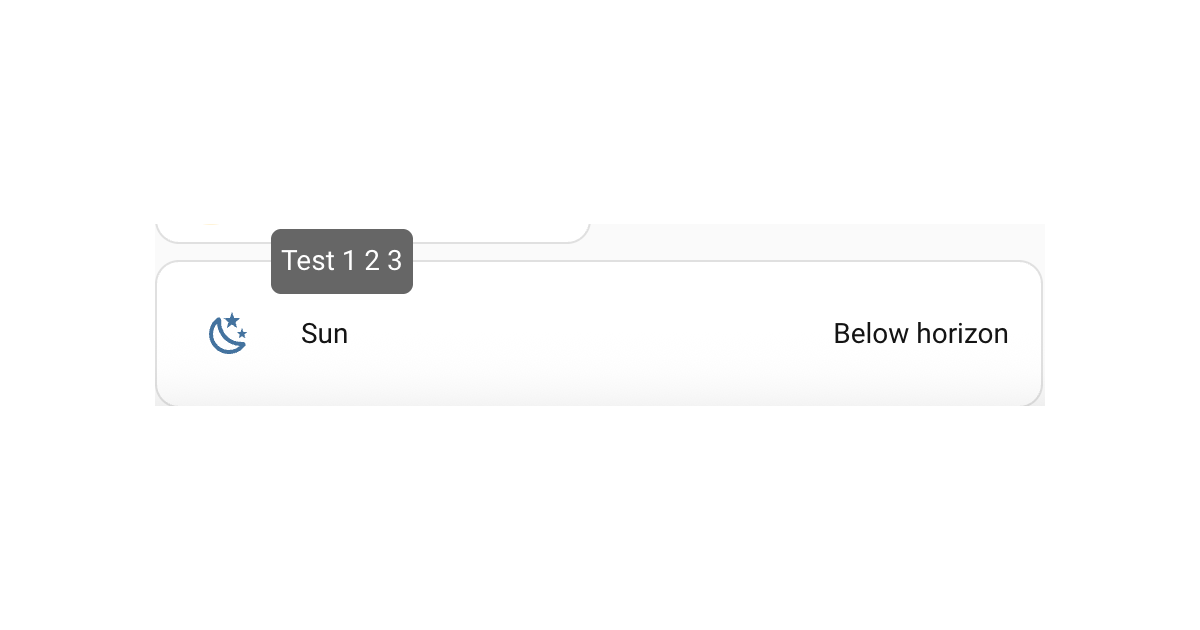
<p>Next is to get a new tooltip. This can be done in CSS using the pseudo element <code class="language-plaintext highlighter-rouge">::before</code> with initial <code class="language-plaintext highlighter-rouge">opacity: 0</code>, then showing on hover with a transition effect to make it appear to be rising from the middle. The below code shows a tooltip over the entities row. There is limited positional control so this will not do fancy positioning, flipping sides etc like <code class="language-plaintext highlighter-rouge">ha-tooltip</code> that <code class="language-plaintext highlighter-rouge">custom:button-card</code> and other Frontend elements use, nor any delay to showing the tooltip. However it works as is with UIX as its pure CSS.</p>

<div class="language-yaml highlighter-rouge"><div class="highlight"><pre class="highlight"><code><span class="na">type</span><span class="pi">:</span> <span class="s">entities</span>
<span class="na">entities</span><span class="pi">:</span>
  <span class="pi">-</span> <span class="na">entity</span><span class="pi">:</span> <span class="s">sun.sun</span>
    <span class="na">uix</span><span class="pi">:</span>
      <span class="na">style</span><span class="pi">:</span>
        <span class="na">hui-generic-entity-row $</span><span class="pi">:</span> <span class="pi">|</span>
          <span class="s">.info {</span>
            <span class="s">pointer-events: none;</span>
          <span class="s">}</span>
          <span class="s">.row::before {</span>
            <span class="s">content: "Test 1 2 3";</span>
            <span class="s">display: inline-block;</span>
            <span class="s">position: absolute; </span>
            <span class="s">bottom: 50%;</span>
            <span class="s">left: 10%;</span>
            <span class="s">background: #666; </span>
            <span class="s">color: #FFF; </span>
            <span class="s">padding: 5px; </span>
            <span class="s">border-radius: 5px;</span>
            <span class="s">opacity:0; </span>
            <span class="s">transition:.3s; </span>
            <span class="s">overflow:hidden;</span>
            <span class="s">max-width: 50%; /* avoids very long sentences */</span>
            <span class="s">pointer-events: none; /* prevents tooltip from firing on pseudo hover */</span>
          <span class="s">}</span>
          <span class="s">.row:hover::before { opacity:1; bottom: 100%; }</span>
</code></pre></div></div>

<div class="admonition homeassistant rounded">
    <p class="admonition-title">Home Assistant output</p>
    <p>
        <p><img src="/assets/elements/2026-02-27-tooltips.png" alt="example" /></p>

    </p>
</div>

<h2 id="tooltip-for-a-card">Tooltip for a card</h2>

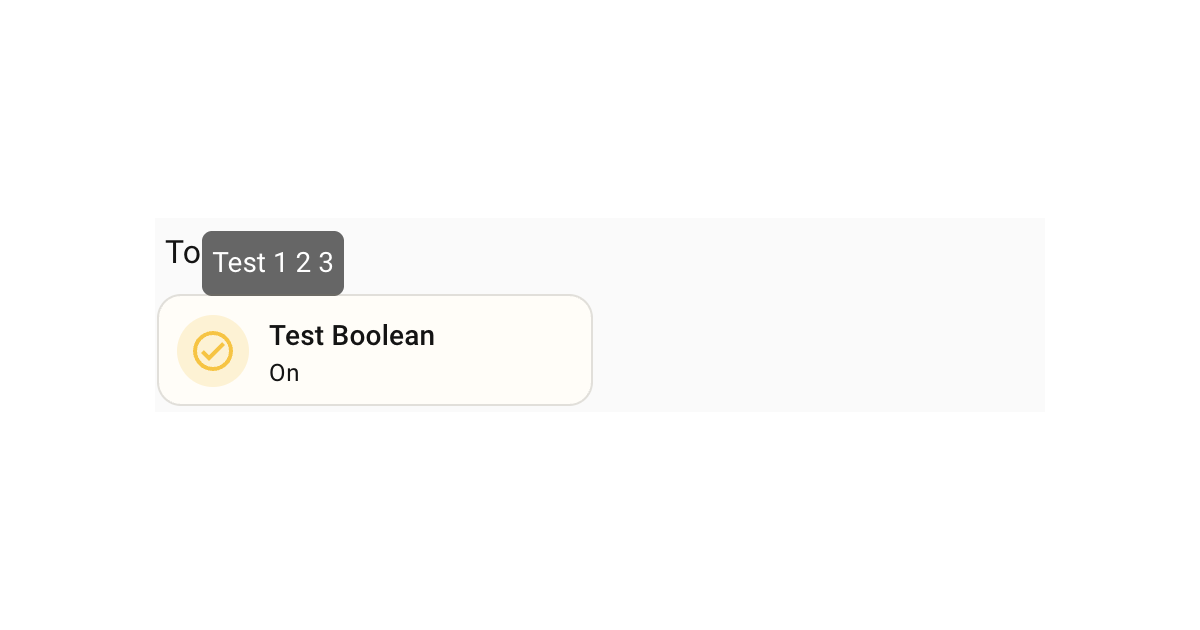
<p>Following on from the example for the entities row, the same technique can be applied to any element, including <code class="language-plaintext highlighter-rouge">ha-card</code>. The following is an example of a tooltip for a tile card.</p>

<div class="language-yaml highlighter-rouge"><div class="highlight"><pre class="highlight"><code><span class="na">type</span><span class="pi">:</span> <span class="s">tile</span>
<span class="na">entity</span><span class="pi">:</span> <span class="s">input_boolean.test_boolean</span>
<span class="na">uix</span><span class="pi">:</span>
  <span class="na">style</span><span class="pi">:</span> <span class="pi">|</span>
    <span class="s">ha-card::before {</span>
      <span class="s">content: "Test 1 2 3";</span>
      <span class="s">display: inline-block;</span>
      <span class="s">position: absolute; </span>
      <span class="s">left: 10%;</span>
      <span class="s">bottom: 50%;</span>
      <span class="s">background: #666; </span>
      <span class="s">color: #FFF; </span>
      <span class="s">padding: 5px; </span>
      <span class="s">border-radius: 5px;</span>
      <span class="s">opacity:0; </span>
      <span class="s">transition:0.3s; </span>
      <span class="s">overflow:hidden;</span>
      <span class="s">max-width: 50%; /* avoids very long sentences */</span>
      <span class="s">pointer-events: none; /* prevents tooltip from firing on pseudo hover */</span>
    <span class="s">}</span>
    <span class="s">ha-card:hover::before { opacity:1; bottom: 100%; }</span>
</code></pre></div></div>

<div class="admonition homeassistant rounded">
    <p class="admonition-title">Home Assistant output</p>
    <p>
        <p><img src="/assets/elements/2026-02-27-tooltips-1.png" alt="example" /></p>

    </p>
</div>]]></content><author><name>Lint-Free-Technology</name></author><category term="elements" /><category term="tooltip" /><category term="entities" /><category term="card" /><summary type="html"><![CDATA[Achieving basic tooltip adaptation with UI eXtension]]></summary></entry><entry><title type="html">Dialog changes in Home Assistant 2026.3</title><link href="/dialogs/2026/02/25/dialog-changes-2026.3.html" rel="alternate" type="text/html" title="Dialog changes in Home Assistant 2026.3" /><published>2026-02-25T00:00:00+00:00</published><updated>2026-02-25T00:00:00+00:00</updated><id>/dialogs/2026/02/25/dialog-changes-2026.3</id><content type="html" xml:base="/dialogs/2026/02/25/dialog-changes-2026.3.html"><![CDATA[<p>There are major changes to dialogs in Home Assistant 2026.3. Changes include:</p>

<ul>
  <li><code class="language-plaintext highlighter-rouge">ha-dialog</code> is now a new element that uses the Web Awesome <code class="language-plaintext highlighter-rouge">wa-dialog</code> component rather than the MDC dialog. The final element used is the browser’s <code class="language-plaintext highlighter-rouge">&lt;dialog&gt;</code> element, which is displayed in the browser’s <a href="https://developer.mozilla.org/en-US/docs/Glossary/Top_layer">top layer</a>.</li>
  <li>the interim <code class="language-plaintext highlighter-rouge">ha-wa-dialog</code> is now <code class="language-plaintext highlighter-rouge">ha-dialog</code> as per above</li>
  <li>a number of dialogs are now using the newer <code class="language-plaintext highlighter-rouge">ha-adaptive-dialog</code> which either uses <code class="language-plaintext highlighter-rouge">ha-dialog</code> for larger views, or <code class="language-plaintext highlighter-rouge">ha-bottom-sheet</code> for smaller views like mobiles.</li>
  <li>more-info dialog is now using <code class="language-plaintext highlighter-rouge">ha-adaptive-dialog</code>.</li>
</ul>

<p>As dialog modding is only a relatively newer feature of UIX, this may not affect you directly. However for those who jumped in and modded out more-info, or other dialogs, you will need to adapt your modifications, especially for more-info dialog.</p>

<p>A start of the types of changes required are below. This list is not exhaustive as there will be many scenarios based on what you have modded:</p>

<ul>
  <li>for dialogs that were using <code class="language-plaintext highlighter-rouge">ha-wa-dialog</code> in the interim, you should be able to change your modifications to update all use of <code class="language-plaintext highlighter-rouge">ha-wa-dialog</code> to <code class="language-plaintext highlighter-rouge">ha-dialog</code>.</li>
  <li>for dialogs that have migrated to <code class="language-plaintext highlighter-rouge">ha-adaptive-dialog</code>, you will need to account for this extra element in your yaml theme selectors plus additional theming for <code class="language-plaintext highlighter-rouge">ha-bottom-sheet</code>.</li>
</ul>

<p>This post will be updated as further examples arise in the 2026.3.0 beta period.</p>

<p><strong>Additional Resource:</strong> For more information on likely changes for <code class="language-plaintext highlighter-rouge">ha-dialog</code> see <a href="https://github.com/thomasloven/hass-browser_mod/issues/1163">Browser Mod Issue #1163</a></p>]]></content><author><name>Lint-Free-Technology</name></author><category term="dialogs" /><category term="dialogs" /><summary type="html"><![CDATA[There are major changes to dialogs in Home Assistant 2026.3. Changes include:]]></summary></entry></feed>