 UI eXtension Guides
Using UIX Broker to customize config/logs to open raw and focused standalone
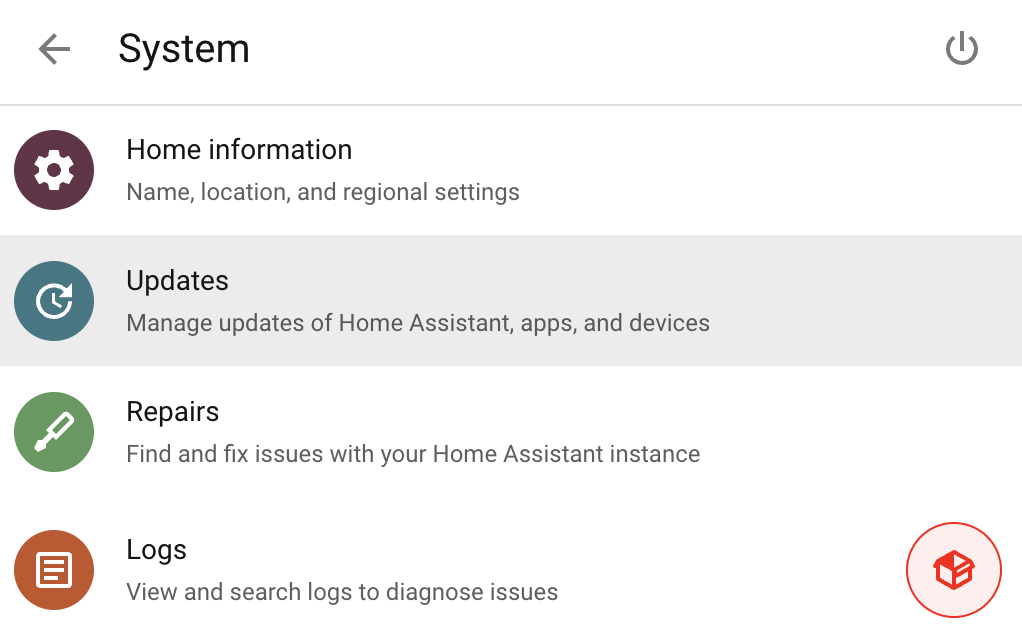
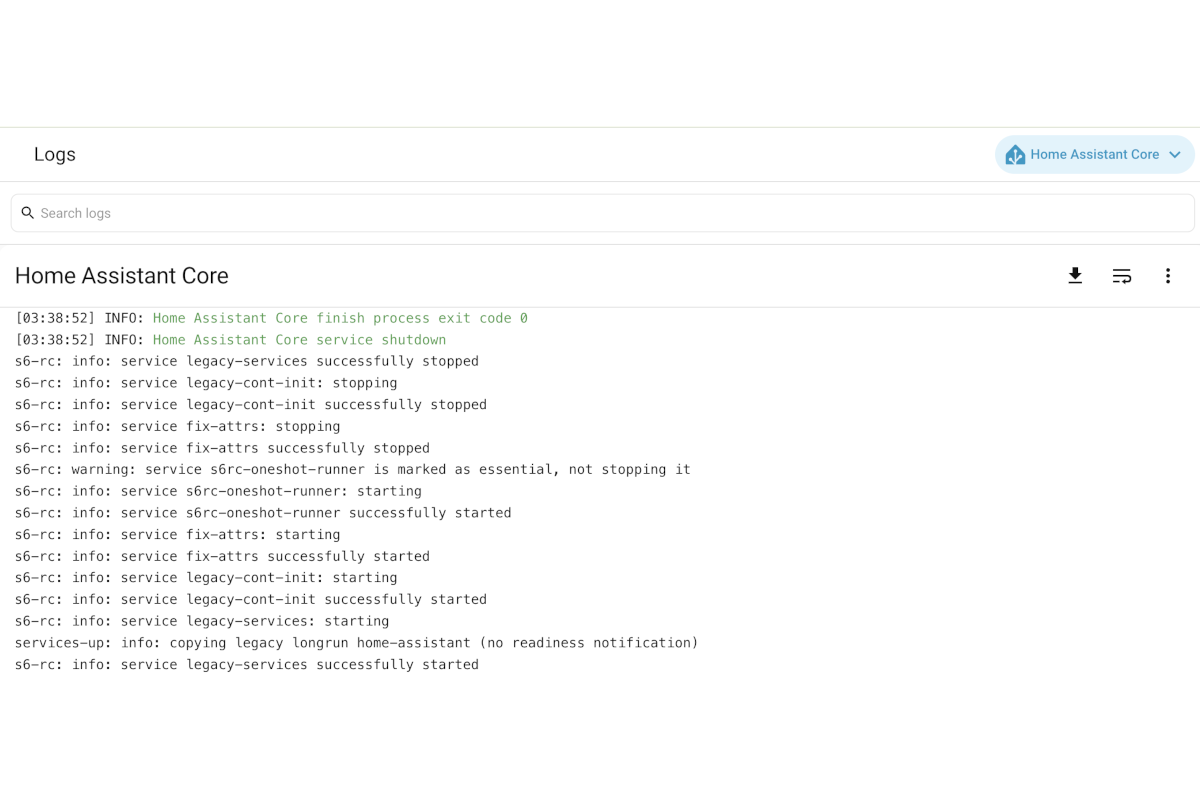
With the archiving of the Home Assistant Community Add-on: Log Viewer, Home Assistant may wish for a similar log viewing experience in a single focussed page using as much viewing space as possible for raw logs. This collection of UIX Broker interactions allows for just that by i. setting the System → Logs to open in a new page, ii. adding a button for secondary focussed log adjustable by input_select entity, iii. setting kiosk mode to the logs view and removing back button, and iv. setting raw more for core logs and turning off wrap lines by default.
Each UIX Broker interaction is explained separately. See Full interaction file to get full yaml to copy and paste into UIX Broker UI config or YAML file.
System → Logs link and additional button
- Interaction listens in Browser realm to
uix-broker-ready,uix-updateanduix-update-custom-system-panelevents.uix-broker-readyis fired on page load when UIX Broker is ready as well as when UIX Broker config is updated or UIX Broker YAML files reloaded.uix-updateis fired after navigation when thepanelstate is ready.uix-update-custom-system-panelis a custom event used for notifying this interaction that entities used injavascriptdirective have changed. See Entity state subscription. The interaction is not reentrant so if it is already running when any of the listener events fire, it will not run twice and the current run will continue to completion. - The interaction anchor used is absolute compact select_tree form for
home-assistantDOM element. - A
panelrule is used to match when thefullUrlPathisconfig/system. Ths is the page where the Logs link shows. - A Host-element rule is used to only match if not running on Companion App, in which case
hass.auth.externalwill be present. - A
propertydirective is used with anchor being the Logs link. It’stargetis set to_blankto open in a new tab. - A
javascriptdirective to prepare button config, including setting by input_select entity if available. Examples of both quoted and camelCase variables are used. See the following directive for how these object variables are used. - A
buttondirective to show an additional UIX Broker button to open up the secondary log set by input_select or hard coded value in 6 above. CSS variables are used to style the button based on config returned in 6.
uix_broker:
  - realm: browser #1
    reentrant: false
    listen:
      - uix-broker-ready
      - uix-update
      - uix-update-custom-system-panel
    anchor: "&home-assistant" #2
    rules:
      - type: panel #3
        path: fullUrlPath
        match: "config/system"
      - anchor: "&home-assistant" #4
        match: "{!.hass.auth.external}"
    directives:
      - type: property #5
        anchor: "&home-assistant $ home-assistant-main $ ha-config-system-navigation $ ha-config-navigation-list $ ha-list-item-button:nth-of-type(4) $ a#item"
        set: target
        value: "_blank"
      - type: javascript #6
        id: config_path
        code: |
          const rawProvider = hass.states['input_select.log_provider']?.state;
          const provider = rawProvider ? rawProvider : 'supervisor';
          return {
            path: `/config/logs?provider=${provider}`,
            label: `Open ${provider.charAt(0).toUpperCase() + provider.slice(1)} logs`,
            icon: 'mdi:package-variant',
            'icon-color': 'red',
            backgroundColor: 'red',
            backgroundOpacity: '0.08'
          };
      - type: button #7
        after: "&home-assistant $ home-assistant-main $ ha-config-system-navigation $ ha-config-navigation-list $ ha-list-item-button:nth-of-type(4) $ a#item div.content"
        # label: "@config_path.label" # Uncomment for label
        icon: "@config_path.icon" # comment if using label
        color: "@config_path['icon-color']"
        tap_action:
          action: url
          url_path: "@config_path.path"
        style: # Remove styles if using label and consider button variant and appearance config
          "--uix-icon-button-background-color": "@config_path.backgroundColor"
          "--uix-icon-button-background-opacity": "@config_path.backgroundOpacity"
          "--uix-button-border-color": '@config_path["icon-color"]'
System Logs
Config logs panel customizations
- Listens in Browser realm to
uix-broker-readywhich is fired on page load when UIX Broker is ready as well as when UIX Broker config is updated or UIX Broker YAML files reloaded. - The interaction anchor used is absolute compact select_tree form for
home-assistantDOM element. - A
panelrule is used to match whenfullUrlPathisconfig/logs - A
searchrule is used to provide a break glass way of viewing config logs without any customizations. e.g./config/logs?noUixBroker - A
propertydirective is used to set theha-config-logselement to be in raw (details) mode. When logs can be condensed like forcoreprovider, this forces the log view to be raw (details). - A
propertydirective is used to set line wrap to false. This is set onerror-log-cardelement which is used for raw (details) logs. - An
eventdirective is used to fire an event on window to set Home Assistant Frontend Kiosk mode. This removes the sidebar. - A
propertydirective is used, with its own rules, to set a default provider if one is not provided by URL search stringprovider=<provider>. Change to suit what you wish default to be. Here it iscore. - A
propertydirective is used to set the inline style of the back button to none. This makes the log fully standalone, removing temptation to browse elsewhere and, say, make this a duplicate dashboard tab. - A
calldirective is used to callstyle.setPropertyon thehome-assistantelement to set--error-log-card-height. The call here sets it tocalc(100vh - 255px + 32px)to account for the16pxtop/bottom margin removed by the theme in (11). - Theme styling is added to the
uix-config-yamlUIX Theme variable to reduceerror-log-cardmargins to 0 and remove card borders.
  - realm: browser #1
    listen: uix-broker-ready
    anchor: "&home-assistant" #2
    rules:
      - type: panel #3
        path: fullUrlPath
        match:
          operator: contains
          value: "config/logs"
      - type: search #4
        path: noUixBroker
        match:
          exists: false
    directives:
      - type: property #5
        anchor: "&home-assistant $ home-assistant-main $ ha-drawer partial-panel-resolver ha-panel-config ha-config-logs"
        set: _detail
        value: true
      - type: property #6
        anchor: "&home-assistant $ home-assistant-main $ ha-config-logs $ hass-subpage div.content error-log-card"
        set: _wrapLines
        value: false
      - type: event #7
        target: window
        name: hass-kiosk-mode
        data:
          enable: true
      - type: property #8
        anchor: "&home-assistant $ home-assistant-main $ ha-drawer partial-panel-resolver ha-panel-config ha-config-logs"
        set: _selectedLogProvider
        value: "core" # Get list of provider from inspecting ha-core-logs and look at _logProviders property
        rules:
          # only apply this directive if the provider does not exist as a search string
          - type: search
            path: provider
            match:
              exists: false
      - type: property #9
        anchor: "&home-assistant $ home-assistant-main $ ha-config-logs $ hass-subpage $ div.toolbar div.toolbar-content ha-icon-button-arrow-prev"
        set: style.display
        value: "none"
        # Remove below directive if not theming reduced margin for the error log card
      - type: call #10
        anchor: "&home-assistant"
        method: style.setProperty
        args:
          - --error-log-card-height
          - calc(100vh - 255px + 32px)
Theme for reduced margin for error-log-card
(11) Add the following to your UIX Theme.
  uix-config-yaml: |

    "ha-config-logs $ error-log-card $": |
      div.error-log-intro {
        margin: 0px;
      }
      ha-card {
        border: none;
      }
Config Logs
Entity state subscription
If you are using an input_select entity to adjust the provider for the button, it will not subscribe to updates as the javascript directive, like the template directive, does not perform any entity state subscription. To enable a subscription you can create a Server realm to Browser realm interaction to listen for state_changed updates in the Server realm and then fire an custom update event to the Browser.
If you are not using input_select.log_provider you do not need this interaction. The config logs interaction above has a default of supervisor hardcoded which you can adjust.
- Listen in
serverrealm
  - realm: server
    enabled: false
    listen: state_changed
    anchor: "&home-assistant"
    directives:
      - type: event
        name: uix-update-custom-system-panel
        rules:
          - type: captured
            path: data.entity_id
            match:
              or:
                - input_select.log_provider
Full YAML config
Full YAML config combining all the YAML code above into one file. If you are adding to an already configured UI Broker UI, or an existing YAML registered UIX Broker file, leave out uix_broker which will already be in the UI config/YAML file.
uix_broker:
  - realm: browser #1
    reentrant: false
    listen:
      - uix-broker-ready
      - uix-update
      - uix-update-custom-system-panel
    anchor: "&home-assistant" #2
    rules:
      - type: panel #3
        path: fullUrlPath
        match: "config/system"
      - anchor: "&home-assistant" #4
        match: "{!.hass.auth.external}"
    directives:
      - type: property #5
        anchor: "&home-assistant $ home-assistant-main $ ha-config-system-navigation $ ha-config-navigation-list $ ha-list-item-button:nth-of-type(4) $ a#item"
        set: target
        value: "_blank"
      - type: javascript #6
        id: config_path
        code: |
          const rawProvider = hass.states['input_select.log_provider']?.state;
          const provider = rawProvider ? rawProvider : 'supervisor';
          return {
            path: `/config/logs?provider=${provider}`,
            label: `Open ${provider.charAt(0).toUpperCase() + provider.slice(1)} logs`,
            icon: 'mdi:package-variant',
            'icon-color': 'red',
            backgroundColor: 'red',
            backgroundOpacity: '0.08'
          };
      - type: button #7
        after: "&home-assistant $ home-assistant-main $ ha-config-system-navigation $ ha-config-navigation-list $ ha-list-item-button:nth-of-type(4) $ a#item div.content"
        # label: "@config_path.label" # Uncomment for label
        icon: "@config_path.icon" # comment if using label
        color: "@config_path['icon-color']"
        tap_action:
          action: url
          url_path: "@config_path.path"
        style: # Remove styles if using label and consider button variant and appearance config
          "--uix-icon-button-background-color": "@config_path.backgroundColor"
          "--uix-icon-button-background-opacity": "@config_path.backgroundOpacity"
          "--uix-button-border-color": '@config_path["icon-color"]'
  - realm: browser #1
    listen: uix-broker-ready
    anchor: "&home-assistant" #2
    debug: true
    rules:
      - type: panel #3
        path: fullUrlPath
        match:
          operator: contains
          value: "config/logs"
      - type: search #4
        path: noUixBroker
        match:
          exists: false
    directives:
      - type: property #5
        anchor: "&home-assistant $ home-assistant-main $ ha-drawer partial-panel-resolver ha-panel-config ha-config-logs"
        set: _detail
        value: true
      - type: property #6
        anchor: "&home-assistant $ home-assistant-main $ ha-config-logs $ hass-subpage div.content error-log-card"
        set: _wrapLines
        value: false
      - type: event #7
        target: window
        name: hass-kiosk-mode
        data:
          enable: true
      - type: property #7
        anchor: "&home-assistant $ home-assistant-main $ ha-drawer partial-panel-resolver ha-panel-config ha-config-logs"
        set: _selectedLogProvider
        value: "core" # Get list of provider from inspecting ha-core-logs and look at _logProviders property
        rules:
          # only apply this directive if the provider does not exist as a search string
          - type: search
            path: provider
            match:
              exists: false
      - type: property #9
        anchor: "&home-assistant $ home-assistant-main $ ha-config-logs $ hass-subpage $ div.toolbar div.toolbar-content ha-icon-button-arrow-prev"
        set: style.display
        value: "none"
        # Remove below directive if not theming reduced margin for the error log card
      - type: call #10
        anchor: "&home-assistant"
        method: style.setProperty
        args:
          - --error-log-card-height
          - calc(100vh - 255px + 32px)
  - realm: server
    listen: state_changed
    anchor: "&home-assistant"
    directives:
      - type: event
        name: uix-update-custom-system-panel
        rules:
          - type: captured
            path: data.entity_id
            match:
              or:
                - input_select.log_provider