 UI eXtension Guides
Using UIX Forge event and button sparks to change inline tile card feature
UIX Forge allows you to forge an element and apply various features with forge sparks. This guide uses UIX Forge to forge a tile element with inline feature which can be changed using the event spark and button spark.
Forge elements
All UIX Forge documentation will describe the card, row, badge, section, picture-element as element as indeed, a forged element is not restricted to being a card, but can be any type supported by UIX Forge mold type
Template macros
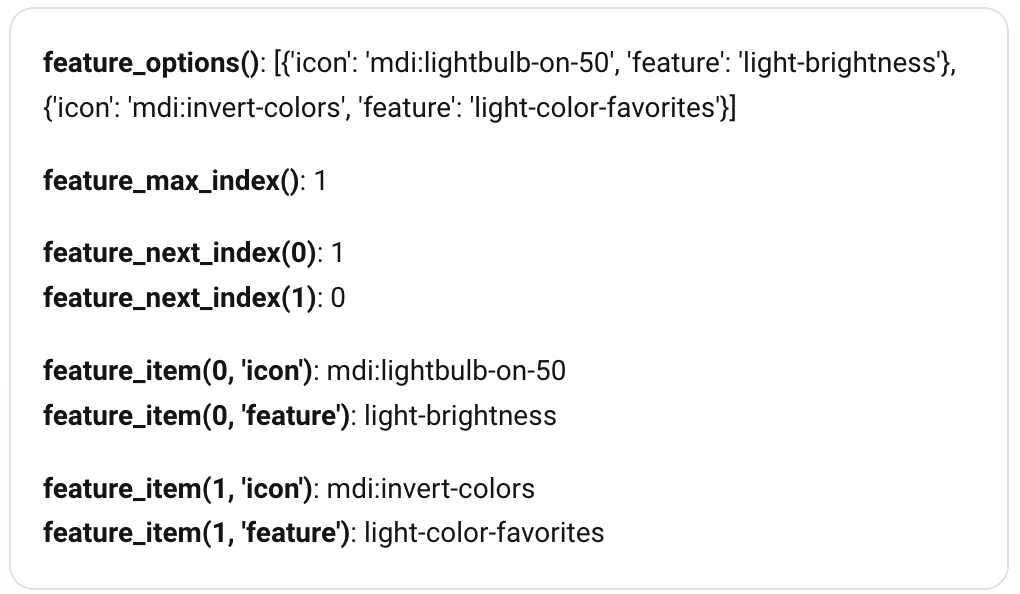
This guide relies heavily on template macros. To first understand the macros and their output, a markdown card will be used as the forged element. This is a good way to check your macros are working as expected before proceeding to use in any final solution.
Four macros are used in the final solution. They are:
-
feature_options(): Returns an array of lookup dicts to provide an icon and a feature. Uses
returns: truereturns method as the macro returns an array. - feature_max_index(): Returns the length of the array returned by feature_options() minus 1 to give a zero-based index. Also uses the returns method as the macro returns an integer.
-
feature_next_index(index): Returns the next zero-based index available in the array, rolling over back to start of the array. Takes a param of
indexand uses returns method as the macro returns an integer. -
feature_item(index, key): Returns the item by key of the dict at the index in the feature_options() array. It takes params of
indexandkey.
type: custom:uix-forge
forge:
  mold: card
  macros:
    feature_options:
      returns: true
      template: |
        {% set options =
          [
            {'icon': 'mdi:lightbulb-on-50', 'feature': 'light-brightness' },
            {'icon': 'mdi:invert-colors', 'feature': 'light-color-favorites' }
          ]
        %}
        {%- do returns(options) -%}
    feature_max_index:
      returns: true
      template: |
        {%- do returns(feature_options() | length - 1) -%}
    feature_next_index:
      params:
        - index
      returns: true
      template: |
        {%- set nextIndex = index | int + 1 -%}
        {%- set maxIndex = feature_max_index() | int -%}
        {%- do returns(nextIndex if nextIndex <= maxIndex else 0) -%}
    feature_item:
      params:
        - index
        - key
      template: >
        {%- set options = feature_options() -%} {%- if index >= 0 and index <
        options | length -%} {{ options[index][key] }} {%- endif -%}
  sparks:
    - type: event
      forge_id: light_tile_{{config.element.entity}}
element:
  type: markdown
  content: |
    **feature_options()**: {{ feature_options() }}

    **feature_max_index()**: {{ feature_max_index() }}

    **feature_next_index(0)**: {{ feature_next_index(0) }}
    **feature_next_index(1)**: {{ feature_next_index(1) }}

    **feature_item(0, 'icon')**: {{ feature_item(0, 'icon') }}
    **feature_item(0, 'feature')**: {{ feature_item(0, 'feature') }}

    **feature_item(1, 'icon')**: {{ feature_item(1, 'icon') }}
    **feature_item(1, 'feature')**: {{ feature_item(1, 'feature') }}
Macro testing output
Switch to tile element
Now the macros are well defined and ready to be used we can start building the forged tile element. Here a static index is used for feature_item(). This will change once the event spark is added.
type: custom:uix-forge
forge:
  mold: card
  macros:
    feature_options:
      returns: true
      template: |
        {% set options =
          [
            {'icon': 'mdi:lightbulb-on-50', 'feature': 'light-brightness' },
            {'icon': 'mdi:invert-colors', 'feature': 'light-color-favorites' }
          ]
        %}
        {% do returns(options) %}
    feature_max_index:
      returns: true
      template: |
        {%- do returns(feature_options() | length - 1) -%}
    feature_next_index:
      params:
        - index
      returns: true
      template: |
        {%- set nextIndex = index | int + 1 -%}
        {%- set maxIndex = feature_max_index() | int -%}
        {%- do returns(nextIndex if nextIndex <= maxIndex else 0) -%}
    feature_item:
      params:
        - index
        - key
      template: >
        {%- set options = feature_options() -%} {%- if index >= 0 and index <
        options | length -%} {{ options[index][key] }} {%- endif -%}
element:
  type: tile
  entity: light.bed_light
  features:
    - type: "{{ feature_item(0, 'feature') }}"
  features_position: inline
Forged tile cards
Output with two copies of the forge code, one as per above, and one changing the index from 0 to 1 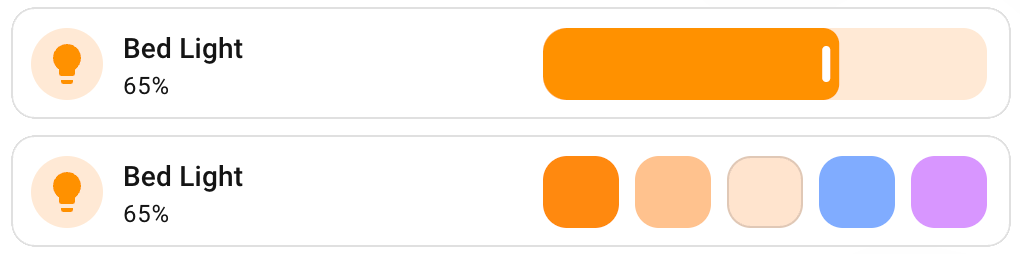
Add event spark
Next we will use the event spark for the forged element to be able to use data received from fire-dom-event.
The event spark needs a forge_id. Here the ID used is made up of a prefix and the entity from the element config.
In the forged element we now use data from the event spark as input to feature_item(). As per event spark guidelines, our event data will not be available when first loaded, so default(0) is used. The data will also come as a string so we cast to int.
type: custom:uix-forge
forge:
  mold: card
  macros:
    feature_options:
      returns: true
      template: |
        {% set options =
          [
            {'icon': 'mdi:lightbulb-on-50', 'feature': 'light-brightness' },
            {'icon': 'mdi:invert-colors', 'feature': 'light-color-favorites' }
          ]
        %}
        {% do returns(options) %}
    feature_max_index:
      returns: true
      template: |
        {%- do returns(feature_options() | length - 1) -%}
    feature_next_index:
      params:
        - index
      returns: true
      template: |
        {%- set nextIndex = index | int + 1 -%}
        {%- set maxIndex = feature_max_index() | int -%}
        {%- do returns(nextIndex if nextIndex <= maxIndex else 0) -%}
    feature_item:
      params:
        - index
        - key
      template: >
        {%- set options = feature_options() -%} {%- if index >= 0 and index <
        options | length -%} {{ options[index][key] }} {%- endif -%}
  sparks:
    - type: event
      forge_id: light_tile_{{config.element.entity}}
element:
  type: tile
  entity: light.bed_light
  features:
    - type: "{{ feature_item(uixForge.event.index | default(0) | int, 'feature') }}"
  features_position: inline
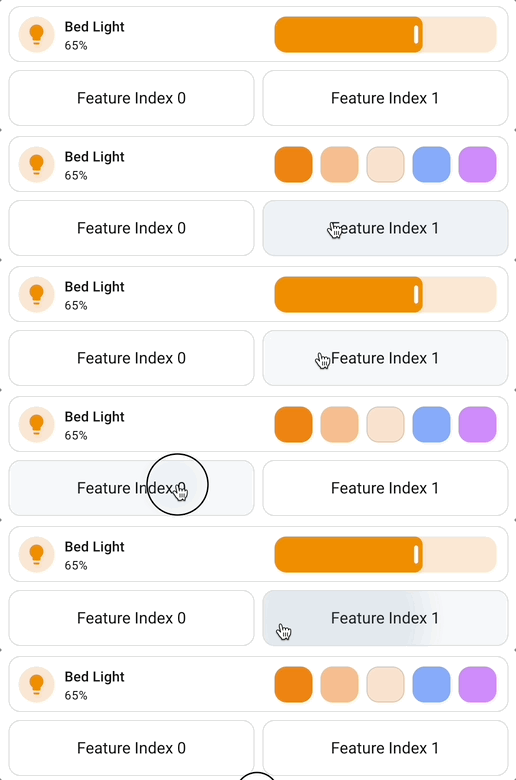
Use buttons to test
First up, we will use two standard buttons to test the solution so far. We need to send 0 and 1 as index to the forge_id light_tile_light.bed_light with uix_forge fire-dom-event.
Two buttons will be used using the YAML below.
show_name: true
show_icon: false
type: button
name: Feature Index 0
grid_options:
  columns: 6
  rows: 1
tap_action:
  action: fire-dom-event
  uix_forge:
    - forge_id: light_tile_light.bed_light
      data:
        index: 0 # one button with 0, one button with 1
Using buttons to send spark event data
Full solution
Now that testing with external buttons show that the event spark is working, we can now use a button spark to add a button adjacent to the inline feature to change the inline feature.
The button spark has the following specific config:
-
after: is set to
hui-tile-card $ hui-card-features. -
icon: is set to
{{ feature_item(feature_next_index(uixForge.event.index | default(0) | int), 'icon') }} -
forge_id: of the
fire-dom-eventforuix_forgeis set tolight_tile_{{config.element.entity}}to match the event spark’sforge_id.
Finally we style the forged tile element to adjust the spacing of the tile to give the feature more room and have the tile icon and the button added to take minimal space.
type: custom:uix-forge
forge:
  mold: card
  macros:
    feature_options:
      returns: true
      template: |
        {% set options =
          [
            {'icon': 'mdi:lightbulb-on-50', 'feature': 'light-brightness' },
            {'icon': 'mdi:invert-colors', 'feature': 'light-color-favorites' }
          ]
        %}
        {% do returns(options) %}
    feature_max_index:
      returns: true
      template: |
        {%- do returns(feature_options() | length - 1) -%}
    feature_next_index:
      params:
        - index
      returns: true
      template: |
        {%- set nextIndex = index | int + 1 -%}
        {%- set maxIndex = feature_max_index() | int -%}
        {%- do returns(nextIndex if nextIndex <= maxIndex else 0) -%}
    feature_item:
      params:
        - index
        - key
      template: >
        {%- set options = feature_options() -%} {%- if index >= 0 and index <
        options | length -%} {{ options[index][key] }} {%- endif -%}
  sparks:
    - type: event
      forge_id: light_tile_{{config.element.entity}}
    - type: button
      after: hui-tile-card $ hui-card-features
      icon: >-
        {{ feature_item(feature_next_index(uixForge.event.index | default(0) |
        int), 'icon') }}
      color: grey
      tap_action:
        action: fire-dom-event
        uix_forge:
          - forge_id: light_tile_{{config.element.entity}}
            data:
              index: >-
                {{ feature_next_index(uixForge.event.index | default(0) | int)
                }}
element:
  type: tile
  entity: light.bed_light
  features:
    - type: "{{ feature_item(uixForge.event.index | default(0) | int, 'feature') }}"
  features_position: inline
  uix:
    style: |
      ha-tile-icon {
        flex: 0;
      }
      ha-tile-info {
        flex: 1;
      }
      hui-card-features {
        flex: 2;
        padding-right: 0px !important;
      }
Full solution

Extra - features as an object
Up until now we have used and set features as a string, assigning the output from feature_item(index, 'feature') to - type: under features:. To extend the solution we can use features as an object. Careful construction of the object is needed here as it is set as a Python dict.
Changes required:
-
featurein theoptionsarray becomes an array with a single dict. For simple features the dict is{ 'type': 'feature-string' } - features requiring more than just
typecan be added as a dict as the sole member of the array. In the example here, a custom feature of a button is used. -
feature_item()now returns an object rather than a string and uses returns method. -
features:config uses the output fromfeature_item()macro directly.
type: custom:uix-forge
forge:
  mold: card
  macros:
    feature_options:
      returns: true
      template: |
        {% set options =
          [
            {'icon': 'mdi:lightbulb-on-50', 'feature': [ { 'type': 'light-brightness' } ] },
            {'icon': 'mdi:invert-colors', 'feature': [ { 'type': 'light-color-favorites' } ] },
            {'icon': 'mdi:cog', 'feature': [ { 'type': 'custom:service-call', 'entries': [ { 'type': 'button', 'icon': 'mdi:cog', 'thumb': 'default', 'tap_action': { 'action': 'more-info', 'target': { 'entity_id': 'light.bed_light' }, 'data': {} } } ] } ] }
          ]
        %}
        {% do returns(options) %}
    feature_max_index:
      returns: true
      template: |
        {% do returns(feature_options() | length - 1) %}
    feature_next_index:
      params:
        - index
      returns: true
      template: |
        {%- set nextIndex = index | int + 1 -%}
        {%- set maxIndex = feature_max_index() | int -%}
        {%- do returns(nextIndex if nextIndex <= maxIndex else 0) -%}
    feature_item:
      returns: true
      params:
        - index
        - key
      template: >
        {%- set options = feature_options() -%} {%- if index >= 0 and index <
        options | length -%}  {%- set option = options[index][key] -%} {% do
        returns(option) %} {%- endif -%}
  sparks:
    - type: event
      forge_id: light_tile_{{config.element.entity}}
    - type: button
      after: hui-tile-card $ hui-card-features
      icon: >-
        {{ feature_item(feature_next_index(uixForge.event.index | default(0) |
        int), 'icon') }}
      color: grey
      tap_action:
        action: fire-dom-event
        uix_forge:
          - forge_id: light_tile_{{config.element.entity}}
            data:
              index: >-
                {{ feature_next_index(uixForge.event.index | default(0) | int)
                }}
element:
  type: tile
  entity: light.bed_light
  features: |
    {{ feature_item(uixForge.event.index | default(0) | int, 'feature') }}
  features_position: inline
  uix:
    style: |
      ha-tile-icon {
        flex: 0;
      }
      ha-tile-info {
        flex: 1;
      }
      hui-card-features {
        flex: 2;
        padding-right: 0px !important;
      }
Full solution
